The Compliance Document Problem on Waste Sites
Every waste management site — transfer station, skip hire yard, composting facility, MRF, AD plant — runs on a stack of compliance documents. Environmental permits, insurance certificates, risk assessments, carrier licences, PAS certifications. Each one has a different issuing body, a different renewal cycle, and a different set of conditions attached to it.
The problem isn't that these documents are hard to obtain. The problem is keeping track of all of them simultaneously — knowing when each one expires, understanding what each one requires, and being able to produce any of them within seconds during an EA inspection or insurance audit.
Most waste businesses manage this with a combination of paper files, email reminders, and memory. That works until it doesn't — and when it fails, it tends to fail at the worst possible moment. An expired carrier licence discovered during a roadside stop. An insurance certificate that lapsed three weeks ago. A permit condition that nobody remembered was in there.
This guide covers every significant compliance document a waste site needs, what each one covers, how long they typically last, and how to build a system that keeps you ahead of every deadline.
The Nine Compliance Documents Every Waste Site Should Track
1. Environmental Permit
Issued by: Environment Agency (England), SEPA (Scotland), NRW (Wales), NIEA (Northern Ireland)
What it covers: An environmental permit is the primary legal authorisation for operating a waste management facility. It specifies what types of waste the site can accept (by EWC code), the maximum quantities, operating hours, emissions limits, monitoring requirements, groundwater protection conditions, odour management, noise limits, and the operator's specific obligations.
Duration: Environmental permits do not have a fixed expiry date — they remain valid until surrendered, revoked, or varied. However, they are subject to periodic review and the conditions can be updated by the regulator. Significant site changes require a permit variation application.
Why this is the most important document on your site: Your permit defines the legal boundaries of your operation. Operating outside permit conditions — accepting waste types not listed, exceeding tonnage limits, operating outside permitted hours — is a criminal offence that can result in permit revocation and prosecution.
Key questions your permit answers:
- Which EWC codes am I permitted to receive?
- What is my maximum annual input tonnage?
- What are my operating hour restrictions?
- What monitoring and record-keeping am I required to do?
- What are my noise, odour, and dust conditions?
- Am I permitted to receive hazardous waste?
The permit reading problem: Most environmental permits run to 30–60 pages of dense regulatory language. The actual operating conditions are buried within. Many operators know their permit number but cannot immediately answer specific questions about their conditions — which becomes a problem during EA compliance inspections.
2. PPC Permit (Pollution Prevention and Control)
Issued by: Environment Agency / devolved regulators
What it covers: PPC permits apply to specific industrial activities — including certain large waste management operations — and cover integrated pollution prevention and control across air, water, and land. PPC permits are typically held alongside an environmental permit for larger operations.
Duration: No fixed expiry — subject to periodic review and variation.
Who needs one: Larger waste management operations, energy from waste facilities, certain composting and AD plants that fall within the Industrial Emissions Directive scope. Check with your regulator whether your operation requires a PPC permit in addition to a standard environmental permit.
3. Public Liability Insurance
Issued by: Commercial insurers
What it covers: Public liability insurance covers claims made against your business by third parties — customers, contractors, visitors, members of the public — for personal injury or property damage arising from your business activities. For waste sites with regular vehicle movements, heavy plant, and public interaction, PL insurance is essential.
Duration: Typically annual renewal — this is the most time-sensitive document in your compliance stack.
Minimum cover: Most commercial contracts and permit conditions require a minimum of £5 million public liability cover. Some local authority contracts and principal contractor requirements specify £10 million or higher.
The lapse risk: Unlike a permit that continues until revoked, insurance lapses on its renewal date. A gap of even a single day means your site is operating uninsured. Many operators run on the same renewal date year after year without a reliable reminder system — and the cost of an uninsured incident vastly exceeds any premium.
Employer's Liability Insurance is a separate legal requirement for any business with employees — it must be displayed on site and the certificate kept accessible.
4. Waste Carrier Licence
Issued by: Environment Agency (England/Wales — CBDU/CBDL format), SEPA (Scotland — WCR format), NIEA (Northern Ireland — ROC format)
What it covers: The legal authorisation to transport controlled waste. Upper Tier (CBDU) is required for commercial waste carriers. Lower Tier (CBDL) covers businesses transporting only their own waste.
Duration: Upper Tier licences are valid for 3 years and must be renewed. Lower Tier licences do not expire.
The expiry trap: Upper Tier carrier licences expire on a specific date with no automatic renewal. The EA sends a reminder, but these can be missed or buried. Operating without a valid registration after expiry — even for a single collection — is an offence. The carrier registration number appears on every WTN, so an expired registration creates a compliance problem across every waste movement made during the lapsed period.
Renewal fee: £105 to renew through the EA online portal.
5. Risk Assessment
Issued by: Internal (your business) or external health and safety consultant
What it covers: A risk assessment identifies the significant hazards in your workplace, who might be harmed, and what controls are in place to reduce the risk. For waste sites, significant risks typically include vehicle movements, manual handling, working at height, plant and machinery, hazardous waste exposure, and fire.
Legal basis: Under the Management of Health and Safety at Work Regulations 1999, employers with five or more employees must record their risk assessments in writing.
Duration: Risk assessments have no fixed expiry, but should be reviewed:
- Annually as a minimum
- After any significant incident or near miss
- When work processes change
- When new machinery or plant is introduced
- When the site layout changes significantly
What an outdated risk assessment signals: An undated or clearly old risk assessment during an HSE inspection suggests that health and safety management is not taken seriously. A current, specific, signed risk assessment is one of the strongest indicators of a well-managed site.
6. Fire Risk Assessment
Issued by: Internal (responsible person) or external fire safety consultant
What it covers: The Regulatory Reform (Fire Safety) Order 2005 requires every non-domestic premises to have a documented fire risk assessment carried out by a competent person. For waste sites, fire risk is particularly significant — waste can self-ignite, fires spread rapidly through stockpiles, and the Fire and Rescue Service may not be immediately accessible on rural or industrial estate sites.
Duration: No fixed expiry, but must be reviewed regularly and after any material change to the premises or the waste streams handled.
What it must cover: Fire hazards and their sources, people at risk, existing fire precautions, emergency procedures, staff fire safety training, fire detection and alarm systems, means of escape.
For waste sites specifically: The risk assessment should address the specific fire risk from waste stockpiles — particularly mixed C&D waste, wood waste, and any organic material. EA guidance on waste site fire prevention should inform the assessment.
7. Waste Carrier Licence (as operator/broker)
If your waste site also acts as a waste broker or dealer — arranging waste transfers between third parties — you need a separate Carrier Broker Dealer registration for the broking activity. This is distinct from the carrier registration covering your own vehicle fleet.
8. PAS 100 Certificate (Composting sites)
Issued by: BSI (British Standards Institution) or approved certification body
What it covers: PAS 100 is the publicly available specification for composted materials in the UK. A PAS 100 certificate confirms that your compost meets the quality standard required for it to be classified as a recovered material rather than waste — meaning it can be applied to land without a waste management licence at the receiving end.
Duration: PAS 100 certification requires ongoing audit and annual renewal. Loss of PAS 100 status means your compost reverts to waste classification — with significant commercial and logistical implications for every load dispatched.
Who needs it: Any composting facility producing compost for land application that wishes to operate under the quality protocol rather than as waste.
9. HACCP Plan (Food waste / organics processing)
Issued by: Internal (developed by the operator) with external verification
What it covers: HACCP (Hazard Analysis and Critical Control Points) plans are required for facilities processing food waste, particularly those producing outputs for land application. HACCP identifies the biological, chemical, and physical hazards in the process and establishes critical control points to ensure safe outputs.
Duration: HACCP plans should be reviewed annually and whenever the process changes.
Regulatory context: For AD plants and composting facilities producing digestate or compost for land application, HACCP is typically a requirement of the relevant quality protocol (PAS 110 for digestate, PAS 100 for compost).
Typical Renewal Cycles — At a Glance
| Document | Renewal Frequency | Renewal Lead Time |
|---|---|---|
| Environmental Permit | No expiry (review-based) | N/A |
| PPC Permit | No expiry (review-based) | N/A |
| Public Liability Insurance | Annual | 4–6 weeks |
| Employer's Liability Insurance | Annual | 4–6 weeks |
| Waste Carrier Licence (Upper Tier) | Every 3 years | 4–6 weeks |
| Risk Assessment | Annual review minimum | Ongoing |
| Fire Risk Assessment | Annual review minimum | Ongoing |
| PAS 100 Certificate | Annual audit | 8–12 weeks |
| HACCP Plan | Annual review | Ongoing |
The Permit Conditions Problem — and Why It Matters
Possessing an environmental permit is one thing. Knowing what your permit actually requires is another.
Many waste site operators know their permit number and can confirm their permit is current. Far fewer can immediately answer specific questions about their permit conditions without hunting through a 40-page document:
- What is the maximum input tonnage my permit allows?
- What EWC codes am I specifically permitted to accept?
- What are my monitoring frequencies for leachate or surface water?
- What are my noise limit conditions and when do they apply?
- Do my permit conditions allow me to accept the load that's just arrived at the gate?
These are operational questions that come up regularly — and getting the answer wrong has real consequences. Accepting a waste type not listed in your permit conditions is a permit breach, regardless of whether the waste itself is harmful.
How My Site AI Solves the Compliance Document Problem
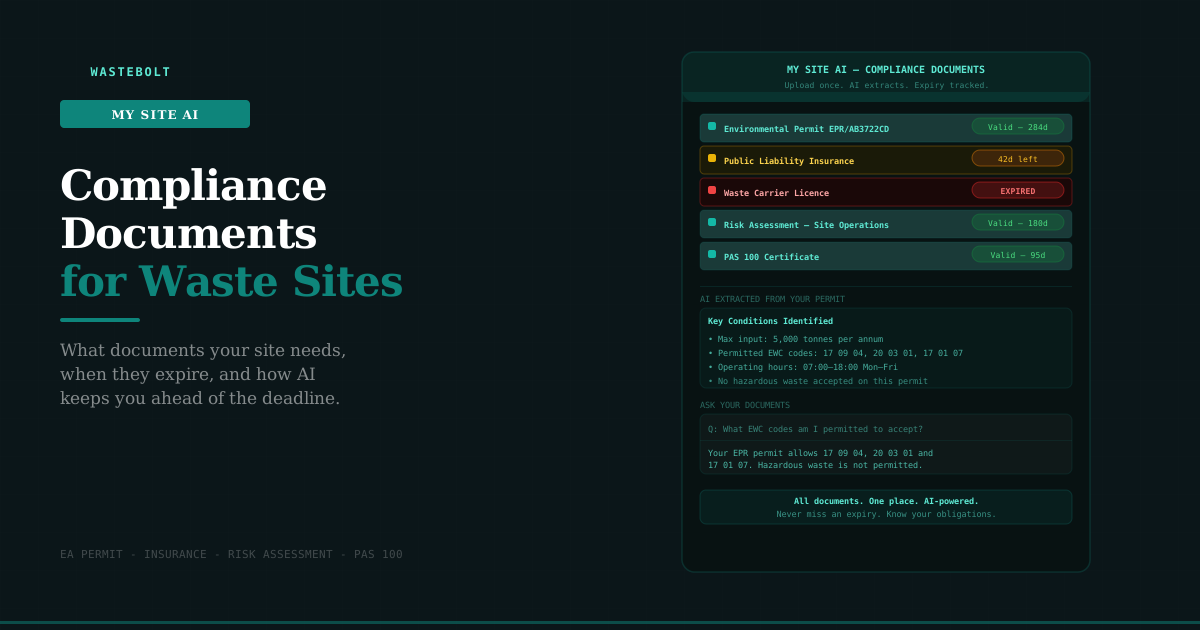
My Site AI is the compliance document management feature within Wastebolt. It addresses both sides of the compliance document problem: knowing what you have and knowing what it says.
Upload and Store
Upload your compliance documents to My Site AI — PDFs, images, Word documents. Every document is stored securely in the cloud, accessible from any device. No more paper files, no more emailing yourself PDFs, no more searching through folders on a shared drive.
Supported document types:
- Environmental permits and permit variations
- PPC permits
- Risk assessments and fire risk assessments
- Public liability and employer's liability insurance certificates
- Waste carrier licence certificates
- PAS 100 and PAS 110 certificates
- HACCP plans
- Waste management licences
- Any other compliance document
AI Extraction
When you upload a document, My Site AI reads it automatically and extracts:
Document type — identifies whether it's a permit, insurance certificate, risk assessment, or other document type.
Issue date and expiry date — extracted from the document text. This is the information that feeds the expiry warning system.
Plain English summary — a 2–3 paragraph summary of what the document covers and its key obligations, written in plain English rather than regulatory language.
Key conditions — up to five of the most important conditions, obligations, or restrictions identified in the document.
This extraction happens within 10–30 seconds of upload. For a 40-page environmental permit, My Site AI produces a usable summary of the key conditions in under a minute — something that would take a compliance manager an hour to do manually.
Expiry Warnings
Every document with an extracted expiry date is tracked automatically. The document list shows:
- Green — valid, expiry date displayed
- Amber — within 90 days of expiry, days remaining shown
- Red — within 30 days of expiry or already expired
The amber and red warnings appear on your Wastebolt dashboard, so you see them every time you log in — not just when you think to check the compliance folder.
Ask Questions About Your Documents
Once your documents are processed, you can ask questions about your specific site using the chat interface:
- "What does my permit allow me to accept on site?"
- "What EWC codes am I permitted to receive?"
- "What is the maximum input tonnage my permit allows?"
- "When does my insurance expire?"
- "What are the key conditions in my PPC permit?"
- "Does my risk assessment cover forklift operations?"
- "What are my noise conditions?"
The AI answers from your actual uploaded documents — not from generic templates or public information. The answer to "what EWC codes am I permitted to receive?" reflects your specific permit conditions, not a general list.
This is the difference between having your compliance documents filed somewhere and being able to use them as an operational resource.
Building a Compliance Document System
Whether or not you use My Site AI, the following principles apply to any compliance document management system:
Centralise everything. All compliance documents in one place — physical or digital. The practice of emailing permit PDFs to yourself and storing insurance certificates in different folders on different machines is a retrieval problem waiting to happen during an inspection.
Record expiry dates separately. Maintain a single list of every document with its expiry date — separate from the documents themselves. This is the thing you check quarterly, not when you're trying to remember whether the carrier licence is still current.
Set reminders with lead time. Insurance renewal requires 4–6 weeks to shop the market and complete the process. Set calendar reminders 3 months before each renewal date, not 2 weeks.
Keep the originals accessible. The original PDF or certificate should be immediately downloadable during an inspection. "It's in the office" is not a sufficient answer when an EA officer is standing in front of you.
Review, don't just renew. When you renew a document — particularly risk assessments — actually review whether the content still reflects your current operation. A risk assessment written when you had 3 staff and one machine is not adequate for a site with 15 staff and a crusher.
Designate a responsible person. Someone in your business needs to own compliance document management — tracking renewals, ensuring reviews happen, maintaining the central record. When nobody owns it, it drifts.
What an EA Inspector Looks For
During a compliance inspection, an EA officer will typically ask to see your permit (which they already have a copy of), and then check your operational compliance against your permit conditions. They may also ask to see:
- Evidence that you have read and understood your permit conditions
- Your site management plan or operating procedures
- Records demonstrating compliance with monitoring conditions
- Waste transfer notes and waste records
- Evidence of appropriate staff training
- Your risk assessments
Being able to produce these immediately, in an organised and accessible format, signals a well-managed site. Fumbling for documents, discovering an expired certificate, or being unable to answer a specific question about your permit conditions are the things that extend inspections and increase the likelihood of enforcement action.
Frequently Asked Questions
Does My Site AI replace a legal review of my permit? No. My Site AI provides a plain-English summary and key conditions to help you navigate your permit operationally. For formal interpretation of permit conditions — particularly where there is ambiguity or a potential dispute with the regulator — consult your environmental consultant or legal adviser.
What if my document is a scanned paper copy rather than a digital PDF? My Site AI uses AI vision to read scanned documents and photos of certificates. Quality matters — a clear scan at 150 DPI or higher will give better extraction results than a blurry photo. For old paper permits, scanning to PDF before upload gives the best results.
Can My Site AI track documents that don't have expiry dates? Yes. Documents without expiry dates — risk assessments, HACCP plans — are stored and accessible but don't show expiry badges. You can set a reminder separately for the annual review date.
Is My Site AI available to all Wastebolt users? My Site AI is available to admin users on all paid Wastebolt plans. Seat users (drivers) do not have access to compliance documents by design.
What happens to my documents if I cancel my Wastebolt subscription? Before cancelling, download all your compliance documents from My Site AI. Your documents are your documents — ensure you retain copies outside any software platform.
Can I upload multiple documents at once? Yes. My Site AI supports drag-and-drop upload of multiple files simultaneously. Each document is processed individually by the AI.
Start a free trial → — upload your first compliance document in under a minute.
Last updated: May 2026. Regulatory references: Environmental Permitting (England and Wales) Regulations 2016 · Management of Health and Safety at Work Regulations 1999 · Regulatory Reform (Fire Safety) Order 2005 · Control of Pollution (Amendment) Act 1989.