The Problem with Paper Site Inductions
Every waste site, skip hire yard, transfer station, and construction operation has some version of a site induction. Someone shows a new visitor around, explains the hazards, points out the emergency exits, and hands them a hi-vis. Or at least, that's what's supposed to happen.
In practice, site inductions at smaller operations are often verbal, undocumented, or recorded on a paper sign-in sheet that gets lost in a drawer. When an HSE inspector or an EA officer arrives and asks "who has been inducted on this site and when?", the answer is often a box of paper forms — or nothing at all.
This is a compliance gap that creates real risk. For any site where contractors, drivers, or visitors regularly attend — and that includes most waste management operations — a proper induction record is both a legal best practice and a practical defence in the event of an incident.
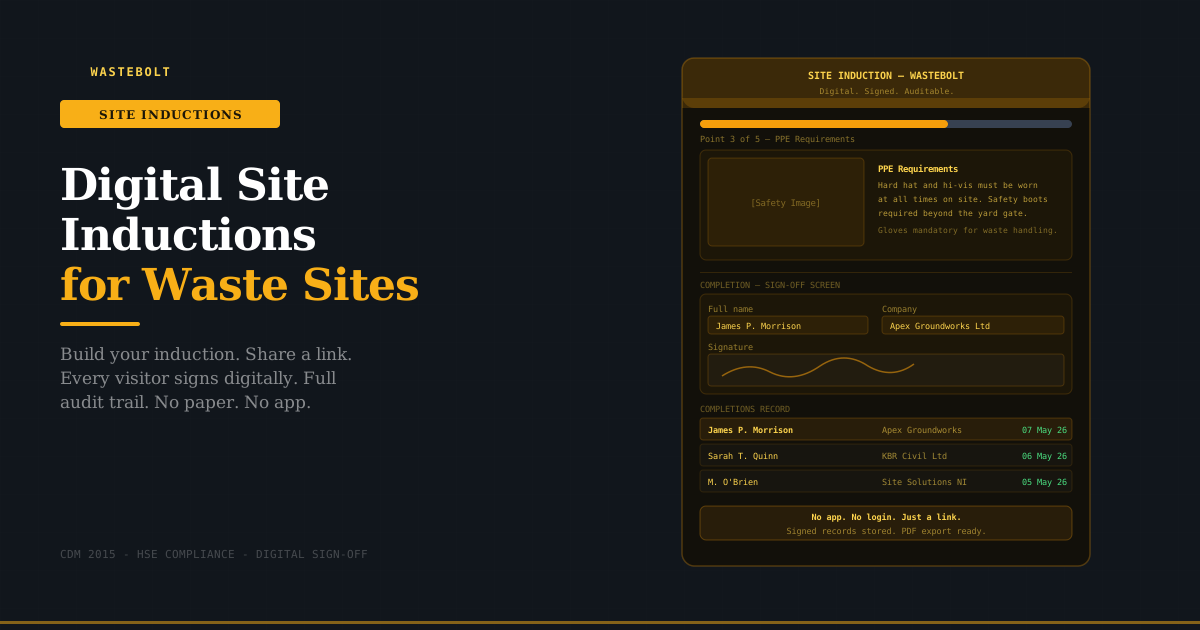
Wastebolt's site induction feature replaces the paper sign-in sheet with a digital induction that any visitor can complete on their phone, without downloading an app or creating an account — and every completion is stored with a timestamp, a digital signature, and the visitor's full details.
Who Needs a Site Induction?
Before covering how the feature works, it's worth being clear about who needs site inductions and why.
Waste transfer stations and permitted sites. Any permitted waste receiving site where drivers, contractors, or members of the public visit regularly. Permit conditions often reference health and safety management, and an undocumented induction process is a gap during EA audits.
Skip hire yard operators. Skip hire yards are working sites with moving vehicles, heavy equipment, and waste handling operations. Contractors, customers, and delivery drivers visiting the yard should be aware of the site rules before they enter.
Construction and demolition sites. CDM 2015 (Construction Design and Management Regulations) places explicit requirements on principal contractors for site safety inductions. Any worker — including subcontractors — must be inducted before commencing work on a notifiable project. CDM 2015 does not specify paper or digital — only that the induction takes place and is recorded.
Composting and AD plant operators. Sites handling organic waste often have specific biosecurity and safety requirements that visiting drivers need to understand before entering. A standard induction covering these requirements, completed digitally by each driver on arrival, is cleaner than relying on verbal briefings.
Any site visited by third-party drivers. Waste carriers collecting from or delivering to your site are third parties on your premises. Your duty of care extends to their safety while on site.
What a Wastebolt Digital Induction Looks Like
The induction system has two sides: the admin side where you build and manage the induction, and the public-facing side where visitors complete it.
Building Your Induction
From the Site Inductions section in Wastebolt, the admin creates an induction by adding a series of points — each one covering a specific safety topic or site rule.
Each point has two components:
An image — a photo of the relevant hazard, area, or equipment. This might be a photo of your PPE requirement signage, a photo of the emergency assembly point, a picture of the site entrance and traffic management, or a photo of waste segregation bays. Visual context makes the induction genuinely useful rather than a box-ticking exercise.
Notes — up to 500 characters of text explaining the point. Keep it specific and actionable. "Hard hat and hi-vis must be worn at all times beyond the gate. Safety boots required. Gloves mandatory for any waste handling." rather than "PPE required."
Points can be reordered by dragging — put the most critical safety information first. A typical site induction for a waste site might cover:
- Site entry and traffic management — where to park, one-way systems, vehicle speed limits
- PPE requirements — what must be worn and where
- Emergency procedures — assembly point location, fire extinguisher locations, first aid
- Waste segregation and handling rules — which bays are for what, no mixing, contamination risks
- Prohibited areas — restricted zones, plant machinery areas, weighbridge procedure
- Environmental rules — no littering, spill reporting, drain locations
You can have as many or as few points as your site requires. The induction is saved and can be edited at any time — when your site layout changes, your PPE requirements update, or your emergency procedures change, you update the induction once and every future completion reflects the latest version.
Sharing the Induction
Once your induction is set up, Wastebolt generates a permanent public link — a URL that looks like wastebolt.app/induction/[your-unique-code]. This link is permanent and doesn't expire.
You can share this link in multiple ways:
- Print it as a QR code on a sign at your site entrance — visitors scan it on arrival
- Include it in pre-visit emails to contractors and drivers
- Add it to your site visitor documentation or contractor onboarding pack
- Display it on a tablet at the site office for walk-in visitors
The visitor does not need to download an app. They do not need to create a Wastebolt account. The link opens in any mobile browser and works on any smartphone.
The Visitor Experience — Step by Step
When a visitor opens the induction link, they see a clean, step-by-step interface:
Progress bar — shows how far through the induction they are. "Point 3 of 6" with a visual progress indicator. This makes clear to the visitor that they need to read all points before signing off.
Each safety point — the image and notes for that point, displayed clearly on screen. The visitor reads the point, then taps Next to move to the following one. They can go back to review previous points.
Sign-off screen — after viewing all points, the visitor reaches the completion screen. They enter:
- Their full name
- Their company name
- The date of the induction
- Their digital signature — drawn with their finger on the touchscreen
Once all fields are complete, they tap Complete. Their record is immediately stored.
Confirmation screen — the visitor sees a confirmation that their induction is complete. No PDF is sent to them — the record lives in your Wastebolt account.
The whole process for a six-point induction typically takes three to five minutes on a phone. It is specifically designed to be quick enough that drivers and contractors will actually complete it rather than skipping it.
The Admin View — Your Completions Record
Every induction completion is stored in Wastebolt and visible from the Site Inductions section. The completions list shows:
- Full name of the person inducted
- Company name
- Date of induction — the date the visitor entered on the sign-off screen
- Completed at — the timestamp when the form was submitted
The list is searchable by name or company — useful when you need to quickly confirm whether a specific contractor has been inducted, or when you're compiling records for an audit.
PDF export — the completions record can be exported as a PDF — a formatted report of everyone who has completed the induction, with all their details, suitable for filing or sharing with a principal contractor, HSE inspector, or insurance auditor.
The induction itself can also be downloaded as a PDF — a formatted version of all your induction points with their images and notes. Useful for creating a printed backup or for sharing the induction content with someone who cannot access a smartphone.
Why Digital Signatures Are Legally Valid
A question that comes up regularly: is a digital signature on a site induction legally valid?
Yes. Under the Electronic Communications Act 2000 and the Electronic Signatures Regulations 2002, electronic signatures carry the same legal validity as handwritten signatures provided they reliably indicate the signatory's intention to be bound by the document.
A touchscreen signature drawn by the visitor, linked to their name, company, and the date they completed the induction, and stored with a timestamp — satisfies this requirement. It is a more reliable record than a paper sign-in sheet where handwriting may be illegible, the date may be missing, and the form can be lost.
For CDM 2015 purposes specifically, the regulation requires that inductions take place and that records are kept — it does not specify that records must be on paper.
The Audit Trail Advantage
The practical value of a digital induction record over paper becomes clear during any kind of review or inspection.
HSE inspection scenario: An inspector arrives following an incident on your site. They ask to see evidence that the contractor involved had been inducted on site safety before the incident occurred. With a paper system, you're searching through files. With Wastebolt, you search for the contractor's name and find the timestamped record within seconds — including the date, the induction content they read, and their digital signature.
EA audit scenario: Your permit renewal or compliance audit requires evidence of contractor management. A searchable, timestamped digital induction record demonstrates a systematic approach to site safety management — considerably stronger than a folder of handwritten forms.
Principal contractor requirement: On CDM-notifiable projects, the principal contractor is required to ensure all workers are inducted. Subcontractors can complete the digital induction link before they arrive on site, and the principal contractor can check the completions record before allowing access.
Insurance claim scenario: Following a site incident, your insurer asks for evidence of your safety management processes. A complete digital induction record covering every visitor to the site over the relevant period is a much stronger position than relying on memory or paper records.
What to Include in a Waste Site Induction
The content of your induction will depend on your specific site, but the following points are relevant to most waste management operations:
Traffic management. Waste sites typically have significant vehicle movements — HGVs, skip lorries, grab trucks. Visitors need to understand the one-way system, where to park, vehicle speed limits, and how to behave around moving plant. This is one of the highest-risk areas on waste sites and should be the first induction point.
PPE requirements. What personal protective equipment is mandatory, where it must be worn, and what happens if a visitor arrives without it. Be specific — "hi-vis and hard hat beyond the weighbridge" rather than "PPE required on site."
Emergency procedures. Location of the emergency assembly point, what to do in the event of a fire or spill, how to raise the alarm, location of first aid equipment. This is legally required content for any site induction.
Waste handling rules. Which waste streams go where, prohibition on mixing hazardous and non-hazardous waste, procedure for contaminated loads, reporting requirements.
Environmental controls. Location of site drains and bund areas, no littering policy, spill reporting procedure, dust and noise management.
Prohibited areas. Any areas of the site that are off-limits to visitors — plant rooms, weighbridge areas, hazardous waste storage.
Biosecurity (composting and AD sites). Boot wash stations, directional flow on site, restrictions on visitor access to processing areas, vehicle decontamination requirements.
Setting Up Your Induction — Getting Started
The site induction feature is available within Wastebolt at /site-inductions. Setup takes around 20 to 30 minutes for a typical six-point induction:
- Go to Site Inductions in your Wastebolt account
- Give your induction a title — your site name and "Site Safety Induction" works well
- Add your first point — upload a photo and write the notes
- Add remaining points — work through your site's key safety topics
- Reorder by dragging — put the most safety-critical content first
- Save — your induction is live immediately
- Copy your public link — print as QR code or share directly
- Share it — with contractors ahead of visits, at the site entrance, in your contractor onboarding documentation
From that point, every visitor who completes the induction appears in your completions record automatically, with no further action required from you.
Keeping Your Induction Current
A site induction is only as useful as it is accurate. If your emergency assembly point moves, your traffic management changes, or you introduce new PPE requirements, your induction needs to reflect that.
Because Wastebolt inductions are digital, updates are immediate — edit the relevant point, save, and every future visitor sees the updated version. There's no need to reprint forms, brief staff about the change, or manage different versions of paper documents in circulation.
Good practice is to review your induction at least quarterly, or whenever your site layout, procedures, or risk profile changes significantly.
Frequently Asked Questions
Does the visitor need to download the Wastebolt app? No. The public induction link opens in any mobile browser — Safari, Chrome, or any other. The visitor does not need a Wastebolt account or any app installation.
What if a visitor doesn't have a smartphone? For visitors without a smartphone, you can display the induction on a tablet at the site office and complete it on their behalf — they draw their signature on the tablet screen. Alternatively, the PDF version of the induction can be printed and signed on paper as a backup, with the signed copy filed manually.
Can I have different inductions for different areas of my site? Currently Wastebolt supports one induction per account. If your operation requires materially different inductions for different site areas or visitor types, contact the Wastebolt team to discuss your requirements.
How long are completion records kept? Completion records are retained for as long as your Wastebolt account is active. There is no automatic deletion of induction records.
Can I see the actual signature from a completion? Yes — the signature image is stored with each completion record and is included in the PDF export.
Does the induction time out or expire? The public link does not expire. Once created, your induction link remains active indefinitely. If you need to invalidate previous completions and start fresh — for example, after a significant site change — you can reset the induction, which generates a new public link.
Is this suitable for CDM 2015 compliance? The digital induction provides a dated, signed record of each worker's induction — which satisfies the CDM 2015 record-keeping requirement for site safety inductions. The content of your induction must cover the site-specific hazards and procedures required by CDM — Wastebolt provides the delivery mechanism and the record, not the content itself. Consult your CDM coordinator or principal designer for guidance on required induction content for your specific project.
Start a free trial → — no credit card required. Your site induction is ready to build in under 30 minutes.
Last updated: May 2026. CDM 2015 reference: Construction (Design and Management) Regulations 2015. Electronic signature validity: Electronic Communications Act 2000 · Electronic Signatures Regulations 2002.