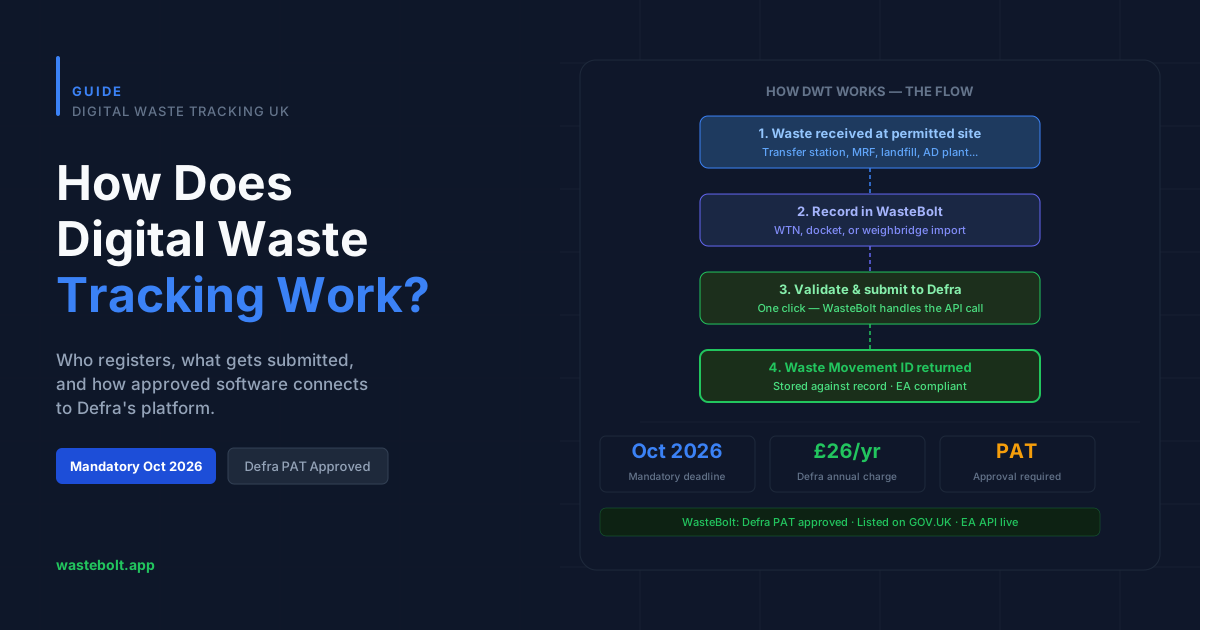
Digital Waste Tracking (DWT) is the UK government's mandatory system for reporting waste movements digitally to Defra and the Environment Agency. From 1 October 2026, every permitted and licensed waste-receiving site in England must submit waste receipt data to Defra on the day it occurs.
If you're trying to understand how the system actually works — who registers, what data gets submitted, how software fits in, and what happens if you don't comply — this guide covers it all.
What is Digital Waste Tracking?
Digital Waste Tracking replaces manual paper-based waste records with a digital reporting system connected directly to Defra's database. The system is operated by the Environment Agency on behalf of Defra and is part of the UK's wider Environmental Improvement Plan.
The core obligation is simple: when a permitted site receives waste, that receipt must be reported digitally to Defra's system on the day it happens. This applies whether you're a transfer station, recycling facility, landfill, composting site, AD plant, or any other licensed waste-receiving operation.
Who needs to use Digital Waste Tracking?
The October 2026 mandate applies to waste receivers — sites that hold an environmental permit or waste management licence to receive waste from third parties. This includes:
- Waste transfer stations
- Materials recycling facilities (MRFs)
- Landfill and landraise sites
- Composting and anaerobic digestion plants
- Metal recycling and scrap sites
- Aggregate and inert waste facilities
- Hazardous waste treatment facilities
Waste producers and carriers are expected to be brought into the system in a later phase, but the October 2026 deadline specifically covers receivers.
Scotland follows the same system but with a later start date of 1 January 2027.
How does the system actually work?
There are two ways to report waste receipts to Defra's system:
Option 1 — Manual upload via spreadsheet Defra provides a spreadsheet template. You fill it in with your waste receipt data and upload it through GOV.UK. This works for very low-volume sites but quickly becomes unsustainable for anyone handling multiple loads per day.
Option 2 — Via approved software with an API connection Software providers like WasteBolt connect directly to Defra's system via API. When you record a waste receipt in the software, it can be submitted to Defra in one click — no spreadsheet, no manual upload, no double-entry.
Only software providers who have passed Defra's Production Approval Tests (PAT) are permitted to offer a live API connection. WasteBolt passed PAT on 11 June 2026 and is listed on GOV.UK as an approved provider.
What data gets submitted to Defra?
Every DWT submission includes the following data points:
- Date and time of waste receipt
- Your site's unique reference (permit or licence number)
- Carrier name, address, and registration number
- Vehicle registration
- EWC code (the waste classification code)
- Waste description and physical form (solid, liquid, etc.)
- Container type
- Weight in kilograms
- Recovery or disposal code (R or D code)
- For hazardous waste: HP codes, consignment code, and POPs data if applicable
WasteBolt maps all of this automatically from your existing waste transfer notes and weighbridge records — you don't fill in anything twice.
What happens after you submit?
When a submission is accepted by Defra's system, it returns a unique Waste Movement ID (also called a wasteTrackingId). This is stored against your record in WasteBolt and acts as the permanent link between your internal reference and Defra's system.
If you later need to correct a submitted record, WasteBolt sends an update (PUT request) to Defra using the original Waste Movement ID, keeping the EA's records accurate.
How do you register for Digital Waste Tracking?
Registration is done through GOV.UK at gov.uk/guidance/report-receipt-of-waste. You'll need:
- A Government Gateway or GOV.UK One Login account
- Your site's environmental permit or licence reference number
- Details of the site(s) you operate
Once registered, Defra issues your organisation a unique API code. This is what links your site to Defra's system. If you're using WasteBolt, you enter this API code in Settings → Integrations to connect your account.
There is also an annual service charge of £26 per organisation from October 2026, payable to Defra regardless of whether you use the manual spreadsheet route or approved software.
What are the consequences of non-compliance?
Failing to submit waste receipt data to Defra from October 2026 puts your site in breach of its environmental permit conditions. The Environment Agency can respond to non-compliance with:
- Formal enforcement notices requiring immediate compliance
- Permit suspension or revocation in serious cases
- Civil sanctions and financial penalties
- Prosecution under the Environmental Permitting Regulations
The EA has been clear that enforcement will follow the October 2026 deadline — this is not a soft launch with a grace period. Sites should be set up and tested before the deadline, not on the day.
How does WasteBolt fit in?
WasteBolt is a DWT software provider listed on GOV.UK. Here's how it works in practice:
- You record waste receipts in WasteBolt — either by creating a WTN, importing from your weighbridge, or using the Skippy quick-capture tool for drivers
- WasteBolt validates each record against Defra's requirements and flags any missing fields
- You submit ready records to Defra in one click
- Defra's system returns a Waste Movement ID which WasteBolt stores against the record
The full flow — from waste receipt to Defra confirmation — takes under a minute per movement.
Not sure where your business stands? Take our free DWT Readiness Check or start a free trial to see the platform before committing.