What Is a Quarterly Waste Return?
A quarterly waste return is a summary of all the waste your business has handled over a three-month period — broken down by customer, EWC code, waste type, weight, and recovery or disposal route. Depending on your business type and any environmental permits you hold, you may be legally required to submit this data to the Environment Agency or your relevant regulator. Even where it's not a formal submission requirement, it's the data your clients, auditors, and compliance managers will ask for.
For businesses running on paper WTNs, compiling a quarterly return means digging through boxes of notes, manually totalling weights by EWC code, and hoping nothing has been misfiled. For businesses using Wastebolt, it takes about 30 seconds.
Who Needs to Complete a Quarterly Waste Return?
Quarterly waste reporting requirements vary depending on your business type and the permits or licences you hold. The main groups who typically need to produce quarterly waste data are:
Environmental permit holders. Waste management sites operating under an environmental permit — transfer stations, MRFs, composting facilities, treatment plants — are typically required to submit waste data returns to the EA as a permit condition. The frequency and format varies by permit, but quarterly is the most common cycle. Permit holders should check their specific permit conditions for their exact requirements.
Local authority contractors. Waste collection and street cleaning contractors working under local authority contracts are almost always required to report tonnages by waste stream on a quarterly basis. The local authority uses this data for its own statutory reporting obligations.
Businesses with client reporting requirements. Many commercial waste contracts — particularly in construction, facilities management, and large retail — require the waste contractor to provide a quarterly tonnage report showing waste volumes by EWC code, waste type, and disposal route. This is increasingly standard in procurement tender requirements.
EA Digital Waste Tracking (from Oct 2026). From October 2026, permitted waste receiving sites must submit movement data to the EA's DWT platform in real time. Quarterly aggregated data pulls from this will become the standard reporting mechanism for EA returns — making structured quarterly data a built-in output of compliant DWT reporting.
Businesses who want to understand their own operation. Even where there is no external reporting obligation, a quarterly waste return is the most useful operational report a waste business can produce. It tells you which customers are generating the most volume, which waste streams dominate, which recovery routes you're using, and how the quarter compares to previous periods.
What Data Goes Into a Quarterly Waste Return?
A quarterly waste return pulls directly from the same data that should already be on your Waste Transfer Notes. For every WTN completed in the quarter, you need:
Customer / producer details
- Name of the business or site that produced the waste
Waste stream data per movement
- EWC code — the six-digit classification code
- Waste type / physical form — solid, liquid, sludge etc.
- Recovery or disposal code — the R or D code showing what happened to the waste
- Net weight in kilograms
Quarter summary
- Total loads per customer
- Total tonnage per customer
- Total tonnage per EWC code across all customers
- Total tonnage per waste type
- Total tonnage per recovery / disposal code
If your WTNs are completed correctly — with accurate EWC codes, weights, and recovery codes on every note — then a quarterly return is simply an aggregation of that data. The information already exists; it just needs to be pulled together.
If your WTNs are incomplete — missing weights, vague waste descriptions, no EWC codes — then compiling a return exposes those gaps, which is itself useful as a compliance audit.
How Wastebolt Generates Your Quarterly Return
Wastebolt's quarterly waste return tool lives in the reporting section of your account. It works by pulling all completed WTNs for the selected period and processing the data automatically — no manual entry, no spreadsheet, no calculations.
Step 1 — Select Your Quarter
Choose the year and quarter from the dropdown. Wastebolt defaults to the current quarter so you're always looking at live data. You can go back up to five years to pull historical quarters for audit or comparison purposes.
Quarters follow standard calendar periods:
- Q1 — January to March
- Q2 — April to June
- Q3 — July to September
- Q4 — October to December
Step 2 — Load the Data
Click Load and Wastebolt pulls all completed WTNs for that quarter from your account — excluding season ticket headers (which are framework documents rather than individual movement records) and any draft or incomplete notes.
The processing happens instantly. For a business completing 200 WTNs per quarter, the full return is calculated in seconds.
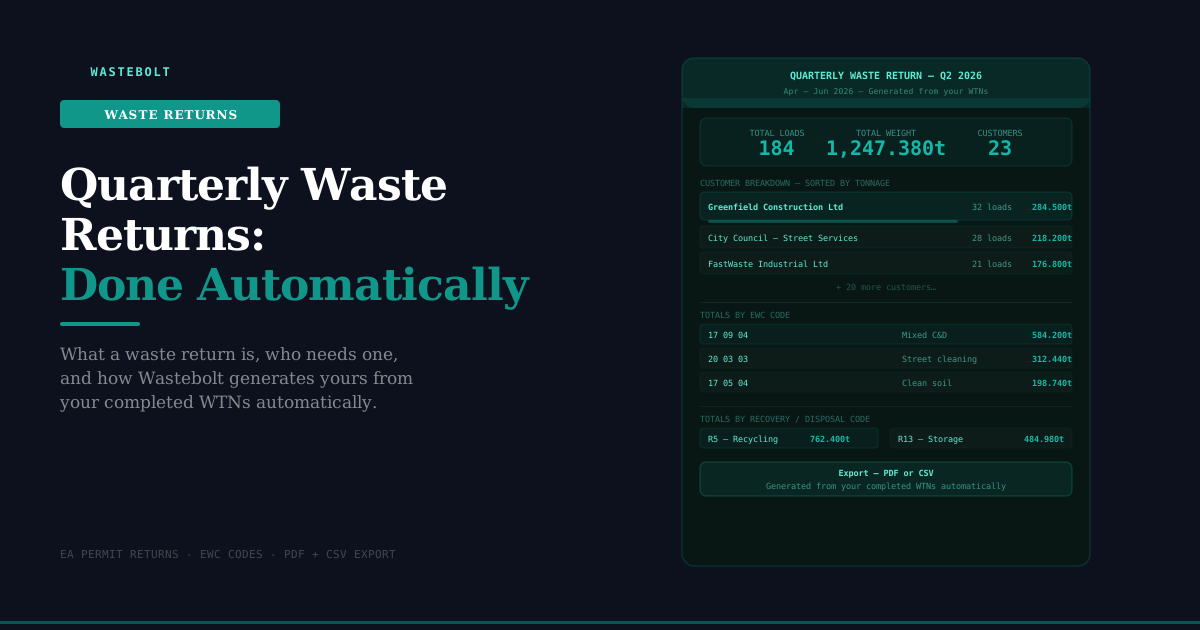
Step 3 — Review the Summary Stats
At the top of the return you get four headline figures:
- Total loads — number of completed WTN movements in the quarter
- Total weight — combined tonnage across all movements, to three decimal places
- Customers — number of distinct customers / producers in the quarter
- EWC codes — number of distinct EWC codes used across all movements
These four numbers give you an immediate sense of the quarter's scale before you drill into the detail.
Step 4 — Customer Breakdown
The main section of the return is the customer breakdown — every customer who appeared on a completed WTN in the quarter, listed in order of total tonnage (highest first).
Each customer row shows:
- Customer name
- Number of loads in the quarter
- Total tonnage for the quarter
Click any customer to expand the detail — a line-by-line breakdown showing every distinct combination of EWC code, waste type, and recovery/disposal code, with the number of loads and total weight for each line. This is the level of detail your clients and the EA typically want: not just "we moved 284 tonnes from Greenfield Construction" but "284 tonnes from Greenfield Construction — 210 tonnes of 17 09 04 to R5 recycling, 74 tonnes of 17 05 04 to R5 recycling."
The expand / collapse all buttons let you toggle between the summary view (all customers visible, detail collapsed) and the full detail view in one click.
Step 5 — Summary Totals
Below the customer breakdown, three summary tables aggregate the entire quarter across all customers:
By EWC Code — total tonnage for each EWC code, sorted highest to lowest. This is typically the primary data your environmental permit return requires — the regulator wants to know how much of each waste type you handled, not necessarily which customer it came from.
By Waste Type — total tonnage by physical form (solid, liquid, sludge, mixed). Useful for operational planning and for clients who need to report by waste form rather than EWC code.
By Recovery / Disposal Code — total tonnage going to each R or D code destination. This demonstrates your compliance with the waste hierarchy — showing the proportion going to recycling (R codes) versus landfill or other disposal (D codes). Permit holders are often required to demonstrate hierarchy compliance in their returns.
Step 6 — Export
Once you've reviewed the data, export in either format:
PDF — a formatted report document with your company details, the quarter period, all summary stats, the full customer breakdown, and the three summary total tables. Ready to send to a client, submit to a regulator, or file for your own records.
CSV — a flat data file with one row per customer per EWC/waste type/recovery code combination, suitable for importing into a client's reporting system, an EA submission portal, or your own Excel analysis.
Both exports are generated instantly from the same underlying data — no reformatting required.
Why This Matters for DWT 2026
From October 2026, permitted waste receiving sites must submit movement data to the EA's Digital Waste Tracking platform in real time. This doesn't replace quarterly returns — it augments them. The DWT platform creates a running record of every movement; the quarterly return aggregates that record into the summary format regulators and clients require.
Businesses already using Wastebolt for their WTNs and DWT submissions will have structured, complete quarterly data available automatically — because the EWC codes, weights, and recovery codes that feed the quarterly return are the same fields that feed the DWT submission. There is no separate data collection step.
Businesses compiling quarterly returns manually from paper WTNs will face a significant additional burden when DWT real-time reporting is added on top — because the data quality required for DWT submission (specific EWC codes, accurate weights, correct container types, POPs declarations) is much higher than what many paper WTN systems currently capture.
The quarterly return tool in Wastebolt is, in this sense, a useful indicator of DWT readiness. If your quarterly return generates cleanly — consistent EWC codes, complete weights, correct recovery codes — your WTN data is DWT-compatible. If it throws up missing values, inconsistent codes, or gaps, those are the same issues that will cause DWT submissions to fail.
Practical Uses Beyond Regulatory Compliance
The quarterly return is also one of the most useful operational tools in Wastebolt, independent of any reporting obligation:
Invoice reconciliation. Cross-reference the customer breakdown against your invoice records for the quarter. Every load on a WTN should have a corresponding invoice line. Gaps in either direction flag potential revenue leakage or billing errors.
Customer volume analysis. Ranking customers by quarterly tonnage tells you immediately who your highest-volume accounts are and how volumes are trending quarter on quarter. This is the data you need for contract renewal conversations and pricing decisions.
Permit condition compliance. Many environmental permits set conditions on the types and quantities of waste a site can receive. Checking the EWC code breakdown against your permit conditions each quarter confirms you're operating within permitted limits before an EA audit does it for you.
Waste hierarchy reporting. The recovery code breakdown shows what proportion of your waste is genuinely being recycled or recovered versus going to disposal. Clients with sustainability reporting obligations — particularly large corporates, public sector bodies, and businesses working toward net zero targets — increasingly require this data from their waste contractors.
Staff performance. The load count and tonnage data by period can be used to understand team output and operational capacity across quarters.
Getting Your Return Right — Data Quality
The quarterly return is only as good as the underlying WTN data. If your WTNs have gaps — missing weights, no EWC codes, vague waste descriptions — the return will reflect those gaps.
The most common data quality issues that affect quarterly returns:
Missing net weights. If the weight field wasn't completed on a WTN, that movement shows as 0kg in the return. For businesses using weighbridges, the actual weight should always be entered before the WTN is finalised.
Inconsistent EWC codes. If the same waste type has been classified differently on different WTNs — 17 09 04 on some, 17 01 07 on others, for the same customer and same waste — the return will split the tonnage across both codes. Standardising EWC codes in the waste type pick-list prevents this.
Missing recovery codes. Where the recovery or disposal code hasn't been completed, the tonnage appears under a blank code in the recovery code summary. This affects permit returns that require a hierarchy breakdown.
Running the quarterly return at the end of each month — rather than waiting until the end of the quarter — catches these issues early enough to correct them before the return period closes.
Frequently Asked Questions
Does the quarterly return include season ticket movements? No. Season ticket header documents are excluded — they are framework agreements covering multiple collections rather than individual movement records. The individual dockets completed under a season ticket are included if they have been recorded as completed WTN movements in Wastebolt.
Can I run a return for a custom date range rather than a calendar quarter? Currently the return is structured around standard calendar quarters (Q1–Q4). If you need a custom date range — for example, a contract period that doesn't align with calendar quarters — the reporting and Ask Bolt features can be used to query custom periods.
Can I compare quarters against each other? You can run the return for any historical quarter going back up to five years and compare the outputs manually. Quarter-on-quarter trending within a single view is on the development roadmap.
Is the data in the return the same data that goes to the DWT platform? The underlying data is the same — EWC codes, weights, recovery codes, customer details. The quarterly return aggregates this data into a summary format. DWT submissions send individual movement records in real time. Both draw from the same WTN data captured in Wastebolt.
Can I share the PDF with a client directly from Wastebolt? The PDF is downloaded to your device. You can then attach it to an email or upload it to a client portal as required. Direct client sharing from within Wastebolt is on the development roadmap.
What if some WTNs from the quarter were completed on paper? Paper WTNs that haven't been entered into Wastebolt will not appear in the return. If you have paper WTNs from the period, they would need to be entered manually or photographed and processed via Bolt Upload before the return will include them.
Start a free trial → — no credit card required. Your first quarterly return is waiting.
Last updated: May 2026.