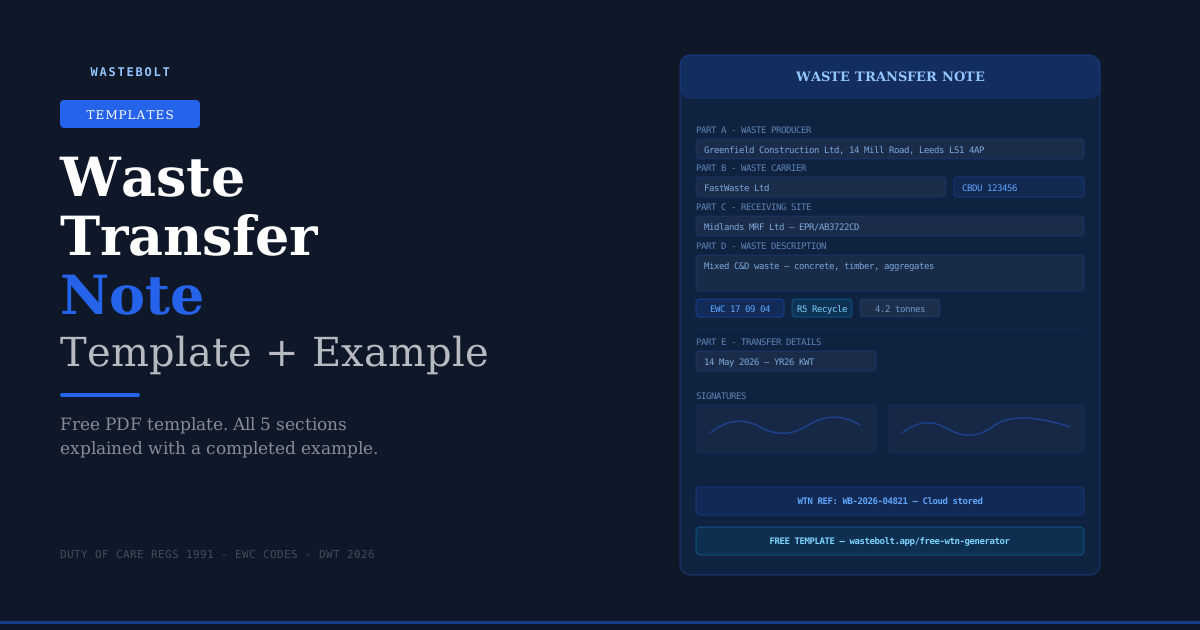
Free Waste Transfer Note Template
If you need a waste transfer note right now — use the free WTN generator at wastebolt.app/free-wtn-generator. No signup, no credit card. Fill in the details and download a legally compliant PDF in under two minutes.
The rest of this guide walks through every section of the template with a completed example, so you know exactly what goes where and why.
What Must a Waste Transfer Note Include?
The Duty of Care Regulations 1991 prescribe exactly what information a WTN must contain. There are five sections — Parts A through E — and all of them must be completed for the note to be legally valid.
Missing or vague information in any section is a compliance failure. The Environment Agency can issue fixed penalty notices and the courts can impose unlimited fines for inadequate waste transfer documentation.
Part A — Waste Producer / Holder
Part A identifies who is transferring the waste — the business or individual handing it over.
What to include:
- Full legal name of the business
- Full address of the premises where the waste was produced (not just the company registered address if different)
- SIC code — the Standard Industrial Classification code that describes your business activity
- Any relevant environmental permit number, registered exemption, or waste management licence held by the producer
Completed example:
Name: Greenfield Construction Ltd Address: 14 Mill Road, Leeds, LS1 4AP SIC Code: 43120 (Site preparation activities) Permit/Exemption: T11 Registered Exemption
Common mistakes in Part A:
Using the company's head office or registered address instead of the site address where the waste was actually produced. If a construction company's registered office is in Manchester but the waste came from a site in Leeds, the Leeds address goes on the WTN.
Leaving the SIC code blank. This is a required field and inspectors do check it.
Part B — Waste Carrier
Part B identifies the business physically transporting the waste. This is one of the most important sections from a compliance perspective — the carrier must hold a valid Waste Carrier Licence, and you as the producer have a legal obligation to verify this before the waste leaves your premises.
What to include:
- Full legal name of the carrier
- Full address of the carrier
- Waste Carrier Registration number — this is mandatory. The format depends on the UK nation:
- England/Wales: CBDU999999 (Upper Tier) or CBDL999999 (Lower Tier)
- Scotland: WCR/R/1234567
- Northern Ireland: ROC UT 9999 or ROC LT 9999
- Vehicle registration number
Completed example:
Name: FastWaste Transport Ltd Address: Unit 4, Hunslet Industrial Estate, Leeds, LS10 2RU Carrier Reg: CBDU 123456 Vehicle Reg: YR26 KWT
How to verify a carrier registration number:
Check the EA's public register at environment.data.gov.uk/public-register/waste-carriers-brokers before the waste moves. An expired or invalid registration leaves you as the producer legally liable even if you paid the carrier to remove the waste.
Common mistakes in Part B:
Not checking the carrier's registration is current. Registrations expire and carriers do not always renew promptly.
Using a carrier's old registration number when they have renewed and been issued a new one.
Part C — Consignee / Receiving Site
Part C identifies where the waste is going and confirms that site is authorised to accept it.
What to include:
- Full name of the receiving site
- Full address of the receiving site
- Environmental permit number, waste management licence number, or registered exemption that authorises the site to accept this type of waste
- For hazardous waste: the site must hold a specific hazardous waste permit or exemption
Completed example:
Name: Midlands Materials Recovery Facility Ltd Address: Ash Road, Walsall, WS1 3PQ Permit Number: EPR/AB3722CD
Common mistakes in Part C:
Not checking that the receiving site's permit covers the specific type of waste being delivered. A site may hold a permit but have conditions that exclude certain waste streams.
Using an exemption number for a site that should hold a full permit. Some waste streams require a full environmental permit — a registered exemption is not sufficient.
Part D — Waste Description
Part D is where producers most commonly make errors. It requires a specific, accurate description of the waste being transferred — not a vague category.
What to include:
- EWC code — the six-digit European Waste Catalogue code. This is mandatory. See the full EWC code list at wastebolt.app/ewc-code-list.
- Waste description — a specific description of the actual waste, not just the EWC category name. "Mixed construction and demolition waste — concrete, timber, plasterboard" rather than just "construction waste".
- Physical form — solid, liquid, gas, sludge, powder, or mixed
- How the waste is contained — loose, in bags, in a skip, in drums etc.
- Quantity — weight in tonnes or kilograms, or volume in litres. An estimate is acceptable but should be labelled as such.
- Recovery or disposal code — the R or D code describing what will happen to the waste at the receiving site (R5 = recycling, D1 = landfill etc.)
Completed example:
EWC Code: 17 09 04 Description: Mixed construction and demolition waste — concrete, bricks, timber, aggregates. Non-hazardous. No asbestos present. Physical Form: Solid Containment: Loose in skip Quantity: 4.2 tonnes (estimated) Recovery Code: R5 (Recycling of other inorganic materials)
Common mistakes in Part D:
Vague descriptions. "Building waste" or "mixed waste" is not sufficient. The description must be specific enough for the carrier and consignee to understand what they are handling.
Wrong EWC code. Using 17 09 04 (mixed C&D waste) when the skip contains only concrete (correct code: 17 01 01) is inaccurate and creates problems if the receiving site sorts by waste type.
Missing the asterisk for hazardous waste. Hazardous waste EWC codes carry an asterisk (*). If your waste is hazardous, it requires a Hazardous Waste Consignment Note — not a standard WTN.
No recovery/disposal code. This field is required and demonstrates compliance with the waste hierarchy.
Part E — Transfer Details
Part E records the date and details of the actual transfer.
What to include:
- Date of transfer
- Time of transfer (or approximate time)
- Any additional references — weighbridge ticket number, job number etc.
Completed example:
Transfer Date: 14 May 2026 Approximate Time: 07:45 Additional Reference: Site Job Ref: GC-2026-0847
Signatures
All three parties must sign the WTN:
- Producer or holder — signs at the point the waste is collected, confirming the information in Parts A and D is accurate
- Carrier — signs on collection, confirming they are licensed to carry this waste
- Consignee — signs on receipt at the destination, confirming the waste arrived and was accepted
For digital WTNs, signatures can be captured on a touchscreen at the point of transfer, or sent via a secure signing link. Electronic signatures are fully legally valid under the Electronic Signatures Regulations 2002.
The signature problem with paper WTNs:
With paper, getting all three signatures on the same document is logistically difficult. The producer signs at collection, the carrier takes their copy, and the consignee signs when the waste arrives — often hours or days later. Distributing completed copies to all three parties then requires posting or emailing scanned copies.
With a digital WTN, all signatures are captured on the same document in real time, a completed PDF is automatically sent to all parties, and the note is stored instantly in the cloud.
Season Tickets — When You Don't Need a New WTN Every Time
If you regularly transfer the same type of waste between the same producer and the same carrier, a Season Ticket allows you to use a single WTN covering multiple collections over up to 12 months.
The Season Ticket is signed once by all parties at the outset and covers all qualifying collections within the period. Each individual collection still requires a docket (date, vehicle, weight) but the full WTN paperwork is completed only once.
Season tickets are particularly useful for:
- Construction sites with ongoing contracts for regular waste removal
- Manufacturers with weekly or daily waste collections
- Skip hire companies with regular commercial customers
Read more about season tickets vs individual WTNs →
How Long Must You Keep a Waste Transfer Note?
- England, Wales, Northern Ireland: 2 years minimum
- Scotland: 3 years minimum
Digital WTNs stored in the cloud cost nothing to retain and can be retrieved in seconds during an EA inspection. Paper notes stored in filing cabinets create retrieval risk and physical storage overhead.
Free WTN Template — How to Use It
Option 1: Free WTN generator (fastest) Go to wastebolt.app/free-wtn-generator. Fill in all five sections on screen. Download a formatted PDF. No account needed, no credit card.
Option 2: Wastebolt app (for regular use) For waste carriers, skip hire companies, and producers completing multiple WTNs per week, Wastebolt saves customers, carriers, waste types, and vehicles as pick-lists so repeat notes take under a minute. Digital signatures, automatic PDF distribution, cloud storage, season ticket management, and direct connection to the EA's DWT platform from October 2026 are all included.
Frequently Asked Questions
Can I use a Word document or PDF template as a legal WTN? Yes — any format is acceptable as long as it contains all the required information from Parts A through E and carries valid signatures from all three parties. A printed and signed Word document is legally equivalent to a purpose-printed WTN book.
Does a WTN need to be on official headed paper? No. There is no requirement for specific headed paper or a government-issued form. The legal requirement is that the document contains the prescribed information and is signed.
What happens if I use the wrong EWC code? Using an incorrect EWC code is a compliance failure. The EA can issue a fixed penalty notice. More seriously, incorrect EWC codes during an inspection trigger further investigation of your waste records and can call your entire compliance record into question.
Do I need a new WTN for every skip I collect? Yes — unless you have a season ticket in place with that specific customer for that specific waste type. Each collection without a season ticket requires its own WTN.
Can the carrier fill in the WTN instead of the producer? The producer must confirm the information in Parts A and D is accurate — they cannot simply delegate the entire document to the carrier. In practice, carriers often pre-fill the template on behalf of the producer who then reviews and signs. Both parties are responsible for the accuracy of the information.
Last updated: May 2026. Legal basis: Environmental Protection Act 1990 · Duty of Care Regulations 1991 · Electronic Signatures Regulations 2002.