How to Fill Out a Waste Transfer Note (Step-by-Step + Example)
A practical, field-by-field guide to completing a UK Waste Transfer Note correctly — whether you are using the government template on paper or a digital system. Covers every required field, what each section means, what to watch out for, and a real worked example.
Before you start: what you need to hand
Completing a WTN mid-collection without the right information to hand is the most common cause of errors. Gather the following before you begin:
Your business (producer)
- Business name and full address including postcode
- SIC code — look this up on Companies House if unsure
- Any environmental permit or exemption number you hold
The waste carrier
- Carrier company name and address
- Waste carrier registration number (CBDU or CBDL prefix)
- Vehicle registration — recommended for every load
The receiving site
- Site name and full address
- Environmental permit number or registered exemption number
- RPS number if applicable (Scotland and Northern Ireland)
The waste itself
- Specific description — not "general waste"
- 6-digit EWC code
- Quantity: weight (kg or tonnes) or volume (m³)
- Physical form: solid, liquid, sludge, powder, or gas
- Containment: skip, bags, loose, tanker, pallet, etc.
Step-by-step: filling out each section
The standard UK WTN template is divided into four parts: A (producer), B (carrier), C (receiving site), and D (waste description), followed by signatures and transfer details. Complete them in order.
Part A — Producer details
~2 minThis section identifies the business or individual responsible for producing the waste. If you are the waste producer, this is your information.
- Name: your trading name or business name as registered
- Address and postcode: the address of the site where the waste was produced — not necessarily your registered office
- SIC code: your Standard Industrial Classification code (e.g. 38.11 for non-hazardous waste collection, 01.11 for cereal farming). Look yours up at Companies House
- Status: mark whether you are acting as Producer, Carrier, Broker, or Dealer
- Permit or licence number: if your site holds an environmental permit or waste management licence, include it here
Part B — Carrier details
~2 minThis section records the licensed waste carrier who is physically collecting and transporting the waste.
- Carrier name and address: the company name and business address of the carrier, not the driver's personal details
- Registration number: the waste carrier registration number — this begins with CBDU (upper tier) or CBDL (lower tier). This field is mandatory and must be accurate
- Vehicle registration: recommended for every transfer; required if the carrier operates a specific vehicle fleet
Part C — Receiving site details
~2 minThis identifies where the waste is going and confirms that the site is authorised to accept it.
- Site name and address: the facility that will receive, treat, or dispose of the waste
- Environmental permit number: most receiving sites hold an environmental permit issued by the Environment Agency (or SEPA/NIEA). Include the full permit reference
- Registered exemption number: if the site operates under a registered exemption rather than a full permit
- RPS number: if applicable in Scotland or Northern Ireland
Part D — Waste description
~3 minThis is the most critical section and the most frequently completed incorrectly. Vague or inaccurate waste descriptions are the leading cause of compliance failures.
- Description: be specific and accurate. "Mixed office paper and cardboard" is correct; "office waste" is not. "Used cooking oil from commercial kitchen" is correct; "food waste" is not
- EWC code: the 6-digit European Waste Catalogue code that classifies your waste type — use our EWC code lookup tool if unsure. Codes ending in an asterisk (*) are hazardous — if your waste has one, stop and use a consignment note instead
- Waste type: commercial, industrial, or construction waste
- Physical form: solid, liquid, sludge, powder, or gas
- Quantity: weight in kg or tonnes, or volume in m³ — estimate if an exact figure is not yet available, but note it as an estimate
- Containment: how the waste is packaged or held — skip, bulk bags, loose in vehicle, tanker, palletised, etc.
Transfer details, date, and signatures
~2 minThe final section records when and where the transfer occurred, the intended treatment route, and collects signatures from all parties.
- Transfer date: the date the waste physically left your site
- Legislative country: England & Wales, Scotland, or Northern Ireland — each has slightly different requirements
- Recovery or disposal code: an R code if the waste will be recovered or recycled (e.g. R3 for recycling, R1 for energy recovery); a D code if it will be disposed of (e.g. D1 for landfill). Choose R codes wherever possible — this demonstrates compliance with the waste hierarchy
- Waste hierarchy confirmation: mandatory in Northern Ireland; best practice everywhere
Field-by-field reference: Parts A–D
The table below lists every field on a standard WTN, whether it is mandatory or recommended, and what to enter:
Part A — Producer
| Field | Status | Notes |
|---|---|---|
| Business name | Required | Trading name or registered company name. |
| Address | Required | Full address of the site where waste was produced, including postcode. |
| SIC code | Required | Standard Industrial Classification code for your business activity. |
| Status | Required | Producer, Carrier, Broker, or Dealer — select whichever applies. |
| Permit / licence number | Recommended | Include if your site holds one. Leave blank if not applicable. |
Part B — Carrier
| Field | Status | Notes |
|---|---|---|
| Carrier name | Required | Company name of the registered waste carrier. |
| Address | Required | Carrier's registered business address. |
| Registration number | Required | CBDU (upper tier) or CBDL (lower tier) registration number. Verify on the EA register. |
| Vehicle registration | Recommended | Strongly recommended. Useful evidence if the load is stopped for inspection. |
| Contact details | Recommended | Phone or email. Not legally required but useful for resolution of any disputes. |
Part C — Receiving site
| Field | Status | Notes |
|---|---|---|
| Site name | Required | Name of the facility receiving the waste. |
| Address | Required | Full address of the receiving facility, including postcode. |
| Permit number | Required | Environmental permit reference. If the site operates under an exemption, use the exemption number instead. |
| RPS number | Recommended | Required in some circumstances in Scotland and Northern Ireland. |
Part D — Waste description
| Field | Status | Notes |
|---|---|---|
| Waste description | Required | Specific and accurate — describes exactly what the waste is. Vague entries like "general waste" are not acceptable. |
| EWC code | Required | 6-digit European Waste Catalogue code. Asterisk (*) entries are hazardous — switch to a consignment note if this applies. |
| Waste type | Required | Commercial, industrial, or construction. |
| Physical form | Required | Solid, liquid, sludge, powder, or gas. |
| Quantity | Required | Weight (kg or tonnes) or volume (m³). Estimates are acceptable if clearly marked as such. |
| Containment method | Required | Skip, bulk bags, loose in vehicle, tanker, palletised, etc. |
| Recovery / disposal code | Required | R code (recovery/recycling) or D code (disposal). Use R codes wherever possible. |
Real worked example
Below is an example WTN for a non-hazardous farm waste transfer — agricultural plastic wrap collected by a licensed carrier and delivered to a recycling facility.
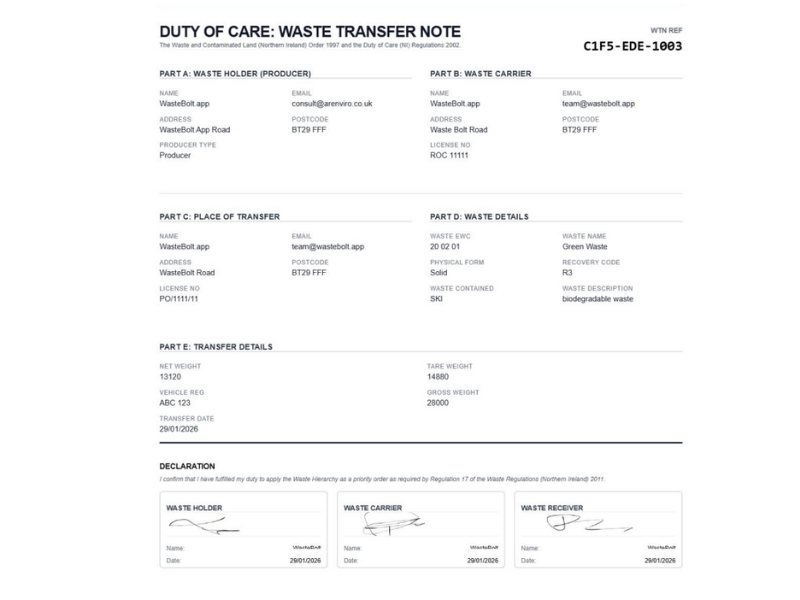
What this example gets right:
- Specific waste description: "Agricultural plastic wrap (silage bale wrap)" — not "farm waste" or "plastics"
- Correct EWC code: 02 01 04 (waste plastics — except packaging — from agriculture). No asterisk, confirming it is non-hazardous
- Verified carrier registration number listed in full with CBDU prefix
- Accurate quantity and containment: 13 tonnes in a RORO skip
- Recovery code R3 (recycling/reclamation of organic substances) — correct for a plastic recycling stream
- All three parties have signed and the date of transfer is recorded
Signatures and distribution
A WTN is not legally valid until it has been signed by all parties involved in the transfer. The producer, carrier, and receiver each sign to confirm that the information on the note is accurate and that their respective Duty of Care responsibilities have been met.
Each party must retain a signed copy for the full retention period. On a paper WTN, this typically means the original goes to one party and carbon copies (or photocopies) go to the others. On a digital system, each party receives a signed PDF via email or can access the record directly through the platform.
Digital signatures are fully legally binding under the Electronic Communications Act 2000. There is no requirement for wet ink. A WTN signed electronically on a compliant platform carries the same legal weight as a handwritten signature.
Common mistakes and how to avoid them
These are the errors that most frequently cause compliance failures, rejected WTNs, and Environment Agency enforcement action:
Vague or inaccurate waste description
Write exactly what the waste is — material, origin, and condition. "Mixed office paper and cardboard" is correct. "General office waste" or "rubbish" is not.
Wrong EWC code
Use the EWC lookup tool for every waste type you are not certain about. The code must match what is described. If the correct code has an asterisk (*), the waste is hazardous and requires a consignment note.
Unverified carrier registration
Check the carrier's CBDU or CBDL number on the EA register before every transfer. Registrations expire and must be renewed — a carrier you used last year may no longer be registered.
Missing or incomplete signatures
All three parties must sign before the transfer is complete. Never let waste leave your site without a signed note in place. Digital signatures obtained on a mobile device at point of collection solve this practically.
Using "D1 Landfill" when the waste is actually being recycled
Select the R code that matches the actual treatment route. Using a D code for a recycling stream misrepresents the waste hierarchy and can constitute a compliance failure.
Selecting the wrong legislative country
The legislative country determines which regulations apply and affects the retention period. Scotland requires three years; England, Wales, and Northern Ireland require two.
Not keeping copies for the full retention period
Paper records can be lost, damaged, or fade. Digital storage with automatic backup eliminates this risk entirely.
What to do if you make a mistake
If you identify an error after a WTN has been signed — for example, you discover the wrong EWC code was used — you should create a corrected version of the note and void the original. Both the original and the corrected version should be retained as part of your audit trail, with a clear record of what was changed and why.
Do not attempt to alter a signed paper WTN by crossing out and overwriting fields — this creates a document of uncertain validity and can raise questions during an audit. A clean corrected note is always preferable.
On digital platforms, corrections are handled through version history — the system records what changed, who made the change, and when, creating a transparent audit trail that is more defensible than a corrected paper document.
How long to keep WTNs
The minimum legal retention period varies by nation:
| Nation | Minimum retention period | Regulator |
|---|---|---|
| England | 2 years | Environment Agency |
| Wales | 2 years | Natural Resources Wales |
| Northern Ireland | 2 years | NIEA |
| Scotland | 3 years | SEPA |
Best practice is to keep records indefinitely. Digital storage costs nothing and means you can retrieve any WTN instantly during an audit or dispute, regardless of how long ago the transfer occurred. Paper records that fade, get damaged, or are lost before the retention period ends carry the same consequences as never having been completed.
Frequently asked questions
Do I need a new WTN for every load?
Yes, unless you have a Season Ticket in place. A Season Ticket covers regular transfers of the same waste type between the same parties for up to 12 months. Each individual load under a Season Ticket still requires a simple docket, but not a full WTN.
Is a digital WTN legally valid in the UK?
Yes. Digital WTNs are fully legal. Electronic signatures are binding under the Electronic Communications Act 2000. The note must contain all the same information that a paper WTN would — the format is flexible, the required fields are not.
What happens if I use the wrong EWC code?
Using the wrong EWC code is a compliance failure. If the correct code has an asterisk (*) and you used a non-hazardous code instead, the transfer was made without the correct documentation for hazardous waste — this carries significantly higher penalties. If you realise the error, create a corrected WTN immediately and retain both versions.
What if I make a mistake after the WTN has been signed?
Create a corrected version and void the original. Retain both as part of your audit trail with a note of what was changed and why. Do not alter a signed document by overwriting fields.
Can I use the same WTN template for hazardous waste?
No. Hazardous waste requires a Hazardous Waste Consignment Note. You can identify hazardous waste by its EWC code — entries marked with an asterisk (*) are hazardous. Using a WTN for hazardous waste transfers is a serious compliance failure.
Does the waste carrier need to sign the WTN at the point of collection?
Yes. The carrier should sign at the point of collection to confirm they have taken responsibility for the waste and that the details are accurate. If this is impractical — for example, on an unmanned drop-off — the carrier should sign as soon as possible afterwards and ensure the producer receives a signed copy.
Related guides
WasteBolt
Fill out WTNs in 2 minutes — not 20
WasteBolt auto-fills EWC codes, carrier details, and disposal sites from your saved pick-lists. Create a fully compliant digital WTN faster than filling out a paper form, with digital signatures and automatic cloud storage built in.
No credit card required · Cancel any time · DWT 2026 ready
Stay ahead of UK waste compliance
Get practical guides, regulatory updates, and the occasional WasteBolt discount — straight to your inbox. No spam, unsubscribe any time.
By subscribing you agree to receive marketing emails from WasteBolt. See our Privacy Policy. Unsubscribe any time.