Watch the tutorial
From October 2026, every controlled waste movement in England must be tracked digitally through the Environment Agency Digital Waste Tracking platform. For sites that run a weighbridge, every load crossing the scale needs a digital Waste Transfer Note submitted to the EA — not a paper docket, not a spreadsheet.
Most weighbridge software was not built with DWT in mind. This article explains what the gap is and how to close it without an IT project.
The Gap Between Your Weighbridge and the DWT Portal
Your weighbridge captures accurate weights and produces dockets. What it does not do is produce DWT-compliant digital WTNs or submit them to the EA portal.
A DWT-compliant WTN needs: full producer details including permit number, full carrier details including waste carrier licence number and vehicle registration, full consignee details including permit number and email, EWC code, net weight in tonnes, transfer date, and recovery or disposal code.
Your weighbridge ticket has the weight and vehicle reg. Everything else needs to come from somewhere. Typing the missing fields manually for every load at a site doing 50 to 200 movements per day is not a realistic workflow.
The WasteBolt Bridge Approach
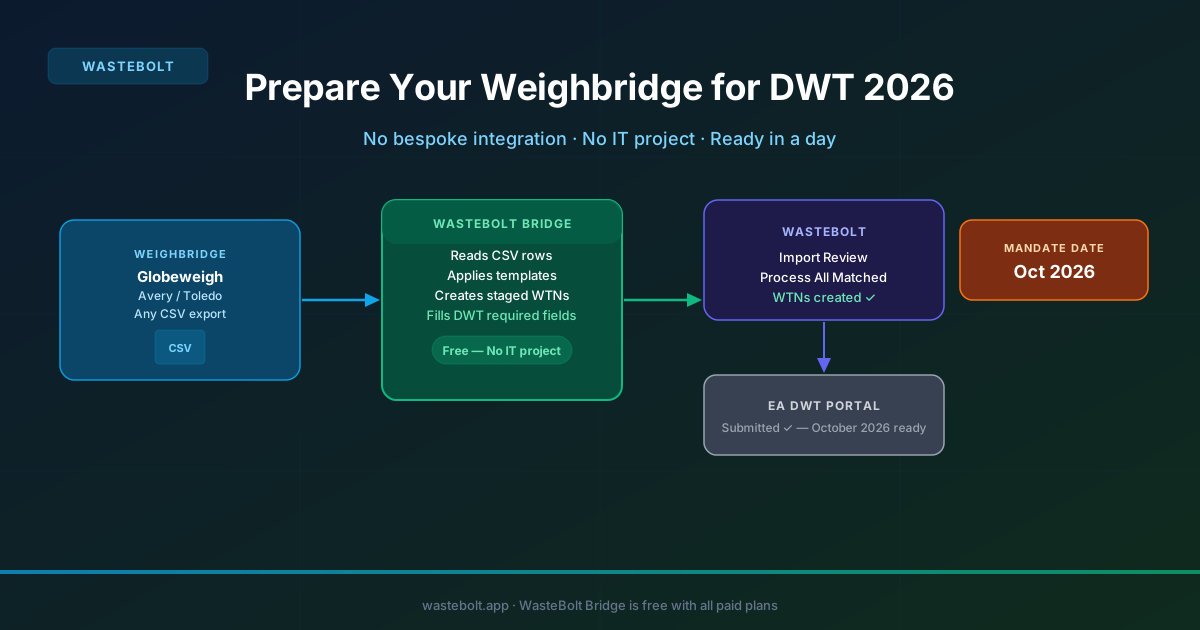
WasteBolt Bridge is a free Windows app that runs on your yard office computer and watches for CSV exports from your weighbridge software. When a new export appears, Bridge reads each row and matches it to a WasteBolt Import Template.
An Import Template says: when a load comes from this company, auto-fill producer details (including permit number), carrier details (including licence number), consignee details, and EWC code. When Bridge finds a match, it creates a fully-formed staged WTN record in WasteBolt with all DWT-required fields already populated.
What This Looks Like in Practice
A transfer station running 80 movements per day might have 15 regular customers. Each customer has a template set up in WasteBolt once. Daily workflow: weighbridge exports its end-of-shift CSV, Bridge detects the file within seconds, Import Templates match all 80 rows, the manager clicks Process All Matched, 80 WTNs are created with all fields populated, then submitted to the EA in bulk from WasteBolt's DWT Submit view. The entire process from CSV to submitted WTN takes a few minutes with no manual data entry per load.
No Bespoke Integration Required
This works because it uses a capability every weighbridge system already has: CSV export. No API to connect, no middleware to configure, no vendor engagement. Globeweigh, Avery Weigh-Tronix, Mettler Toledo, Rice Lake, Fairbanks, and any custom format are all supported.
DWT Readiness Checks Built In
WasteBolt's DWT Submit view runs a readiness check on every WTN before submission — carrier name, vehicle reg, receiver permit number, EWC code, and weight. Because Bridge and Import Templates populate these automatically, the checks typically pass for all matched records. Any issues are flagged clearly as errors or warnings before you submit.
Getting Ready Before October 2026
Download WasteBolt Bridge now and set up your watch folder. Create Import Templates for your regular customers — typically half a day for a site with 10 to 20 regulars. Run Bridge for a few weeks to confirm all movements are matching correctly. By October 2026 your workflow is already in place.
WasteBolt Bridge is free and included in all paid WasteBolt plans.