Two Businesses, One Movement, Two Sets of Records
Every regulated waste movement in the UK involves at least two parties: the carrier who collects and transports the waste, and the receiving site that accepts it. Both are legally required to hold records of that movement.
In practice, those records are usually created independently. The carrier has their copy. The receiver has their version. They might match. They might not. There is rarely a clean, automated handoff between the two.
WasteBolt Linked is built specifically to solve this.
The Traditional Workflow and Its Problems
Under the current norm, the document exchange between carrier and receiver looks something like this:
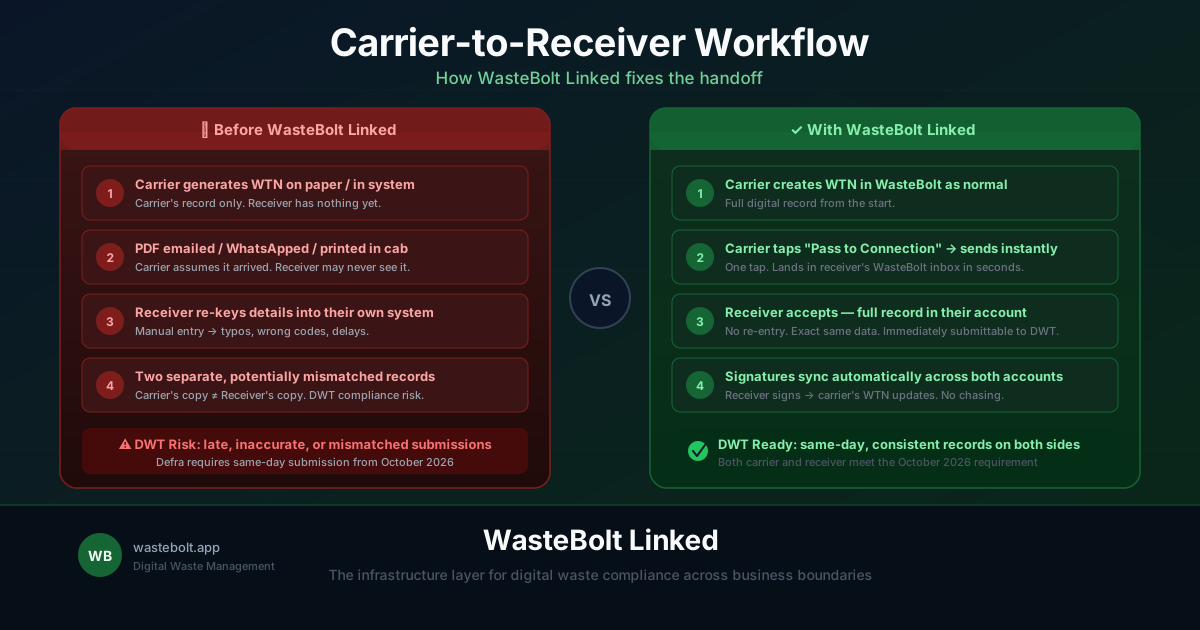
The carrier produces a WTN on arrival or after collection. A copy is left with the receiving site — often printed, sometimes emailed, occasionally photographed and sent via WhatsApp. The receiving site then either files that copy or, if they are using a digital system, manually re-enters the information.
This creates several problems:
Data entry errors. Every time a document is re-keyed, there is an opportunity to introduce mistakes — wrong waste codes, wrong quantities, incorrect addresses.
Lag. If the carrier emails the PDF at the end of the week, the receiving site's records are a week behind.
Inconsistency. The carrier's record and the receiver's record can diverge over time, especially once signatures or amendments are added.
Compliance exposure. Under Digital Waste Tracking, both parties need accurate records submitted in a timely way. Mismatched records or delayed submissions are a compliance risk.
How WasteBolt Linked Changes the Workflow
With WasteBolt Linked, the handoff is built into the system.
Once a carrier and a receiving site are connected on WasteBolt Linked, the carrier can pass a WTN or docket to the receiver directly from within WasteBolt. The receiver gets it in their inbox, reviews it, and accepts it into their own records with a single tap.
The full document arrives — not a PDF, not a link, but a live WasteBolt record in the receiver's account. They can view it, sign it, and submit it to DWT without any re-entry.
What the Carrier Gains
For the carrying business, WasteBolt Linked removes the admin of chasing confirmations. Once a WTN is passed and accepted, both parties hold a consistent record. There is no back-and-forth over whether the receiver got the document or whether their copy matches yours.
If the receiver signs their copy, those signatures are automatically synced back to the carrier's original WTN. The carrier's record is updated without them doing anything — no chasing, no requesting a countersigned copy by email.
What the Receiver Gains
For the receiving site, WasteBolt Linked eliminates the re-entry problem entirely. Every accepted transfer arrives as a complete, structured record — waste description, SIC codes, quantities, producer details, carrier details, and any attached evidence.
For sites receiving dozens of loads per day from multiple carriers, this compounds quickly. Each accepted transfer is immediately available for DWT submission. No batch uploads. No end-of-week panic.
Handling Season Ticket Loads
Some carriers operate under season ticket arrangements — a single agreed document covering multiple loads over a period of time. WasteBolt Linked recognises season ticket dockets and treats them as read-only within the passing workflow.
Carriers can still view and delete season ticket dockets, but they cannot be passed to a connection or edited. This preserves the integrity of the seasonal agreement and prevents the load records from being modified after the fact.
The Compliance Picture
Digital Waste Tracking (DWT) requires receiving sites to submit movement records on the day of receipt from October 2026. A workflow where the receiver is manually re-keying from a PDF email received three days later is not going to meet that standard.
WasteBolt Linked closes the gap between when a movement happens and when both parties hold an accurate, submittable record. It is not just a convenience feature — for businesses operating at volume, it is the foundation of a compliant DWT workflow.
Getting Started
To use WasteBolt Linked, both businesses need active WasteBolt accounts. The connecting process takes a minute: one business sends a connection request, the other accepts, and the link is live.
From that point, every WTN and docket in scope can be passed, received, and recorded without a single email, PDF, or piece of re-entry involved.
Find the full setup guide at My Site → WasteBolt Linked in your WasteBolt account.