What Makes a Good Waste Transfer Note App?
Paper WTNs completed in the cab with a biro. Carbon copies going missing between the driver and the office. An EA inspection where you cannot produce a note from 14 months ago because the filing cabinet was cleared out during an office move. These are not edge cases — they are the day-to-day reality for thousands of UK waste businesses still running on paper.
A waste transfer note app solves all of this. But only if it captures the right data, works properly on a phone, and is actually built for the waste industry rather than a generic form tool dressed up with green branding.
This guide covers what to look for in a WTN app, what the October 2026 DWT mandate means for your choice, and what WasteBolt does specifically — including a free option if you only need an occasional note.
What a Waste Transfer Note App Actually Needs to Do
A WTN is a legal document with five mandatory sections — Parts A through E. An app that does not capture all of them is not compliant, regardless of how slick it looks.
The non-negotiables:
- All five WTN sections: producer, carrier, receiver, waste description, and transfer details
- EWC code search or validation — not a free-text field where wrong codes go unchecked
- Legal e-signatures captured on any device — phone, tablet, or desktop
- Instant PDF generation in the correct format
- Cloud storage with search and retrieval for audit trail
- Works on mobile without needing an app store download
What separates a good app from a basic one:
- Saved pick-lists for customers, carriers, waste types, and vehicles — so repeat collections take under 90 seconds instead of 5 minutes
- Season Tickets for regular collections between the same parties
- Hazardous Waste Consignment Notes as well as standard WTNs
- Direct DWT 2026 submission built in (more on this below)
- Driver seat access so your team can complete notes in the field without seeing your accounts or settings
If an app is missing any of the non-negotiables, it is not a compliant WTN solution — it is a note-taking tool that creates a compliance gap.
Why Your WTN App Choice Matters More From October 2026
From October 2026, every permitted or licensed waste receiving site in England, Wales, and Northern Ireland must record incoming waste movements on the Environment Agency's Digital Waste Tracking (DWT) platform. Scotland follows in January 2027.
This means any waste transfer note app that does not connect to the EA's DWT platform will leave you needing a second system from October onwards — logging movements in your WTN app and then re-entering the same data into the DWT portal manually. That is exactly the kind of double-entry that digital systems are supposed to eliminate.
The smart choice is an app that already has the DWT integration built and tested. WasteBolt has completed the EA's Production Approval Test (PAT) process — the integration is live, validated against Defra's test scenarios, and submits directly to the DWT platform from within the app. No separate portal login. No spreadsheet export. No double-entry.
If you are evaluating WTN apps now, ask every provider one question: have you completed the EA's PAT process? If the answer is no or unclear, they are not ready for October 2026.
Mobile-First vs Mobile-Compatible — The Difference Matters
Many waste management software tools were built for desktop and had a mobile view bolted on later. The result is dropdowns that do not scroll properly on a touchscreen, forms that require pinching and zooming to complete, and date pickers that fight with the phone keyboard.
For a driver completing a WTN in the cab or on a loading bay, a tool like this gets abandoned quickly. They revert to paper, the office does not have the data, and the compliance gap reopens.
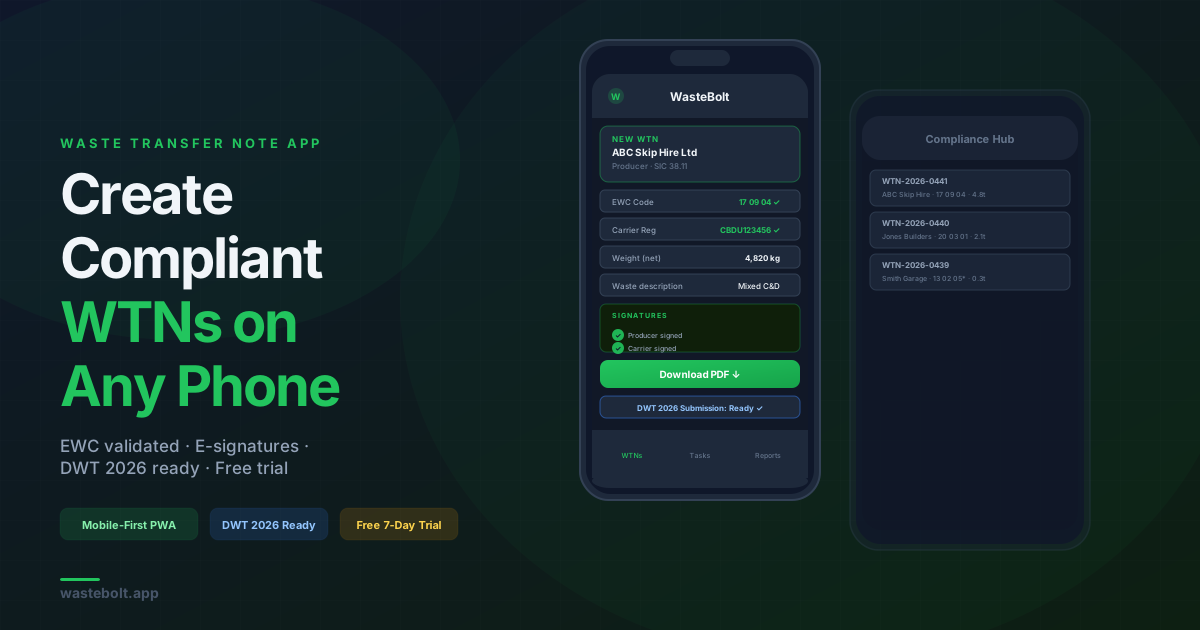
WasteBolt is built mobile-first as a Progressive Web App. It works on any smartphone or tablet without downloading from the App Store or Google Play — open it in a browser and it works as a full native-feeling app. Every dropdown scrolls correctly within the viewport. Every field is touch-optimised. The EWC code search works on a phone keyboard. The signature pad captures cleanly on a touchscreen.
This is not a minor UX point. If the app does not work well in the field, it does not get used in the field.
How WasteBolt Works as a Waste Transfer Note App
Here is what actually happens when you create a WTN in WasteBolt, step by step:
1. Open WasteBolt on your phone No download required. Open the browser, go to wastebolt.app, log in. Works on iOS and Android.
2. Select your customer If you have collected from this producer before, they are in your pick-list. One tap and their name, address, SIC code, and permit number are pre-filled.
3. EWC code Search by keyword or code. WasteBolt validates the format to XX XX XX and flags hazardous codes with an asterisk warning.
4. Carrier details Pre-filled from your carrier pick-list. Registration number, address, vehicle registration — all saved from the last time you used this carrier.
5. Waste description, form, containment, weight Dropdowns for physical form (solid, liquid, sludge) and containment type (skip, bag, IBC, tanker, loose). Weight fields for gross, tare, and auto-calculated net.
6. Transfer details Date picker, legislative country, recovery or disposal code from the R1–R13 / D1–D15 list.
7. Signatures All three parties sign on-screen, or you send a secure signing link by email. The receiver can sign on their own device without a WasteBolt account.
8. PDF generated A formatted A4 PDF is produced instantly with your company header, all five sections, the declaration, and all three signature blocks. Sent automatically to all parties.
9. Stored permanently The note is stored in your Compliance Hub, searchable by date, customer, EWC code, or carrier. Available instantly for EA inspections.
For a repeat collection with saved pick-lists, steps 2 through 6 take under 90 seconds.
WasteBolt also covers three note types in one platform: non-hazardous WTNs, Hazardous Waste Consignment Notes (including HP codes and POPs), and Duty of Care Season Tickets for regular collections.
Free WTN App vs Paid — What Is the Difference?
WasteBolt offers a free WTN generator at wastebolt.app/free-wtn-generator — no account, no subscription. You complete all five sections, enter your email address, and your WTN downloads as a PDF instantly. Suitable for businesses that need an occasional note and do not need cloud storage or e-signatures.
For businesses producing regular WTNs, a paid account adds everything the free tool does not have:
| Feature | Free Generator | WasteBolt Account |
|---|---|---|
| Create WTNs | ✓ | ✓ |
| PDF download | ✓ | ✓ |
| No account needed | ✓ | — |
| Cloud storage | — | ✓ |
| Legal e-signatures | — | ✓ |
| Saved pick-lists | — | ✓ |
| Season Tickets | — | ✓ |
| Hazardous notes | — | ✓ |
| DWT 2026 submission | — | ✓ |
| Driver seat access | — | ✓ |
| Audit trail | — | ✓ |
Accounts start from £24.99 per month + VAT with a 7-day free trial and no credit card required.
What About Using a Generic App — Google Forms, Excel, WhatsApp?
These come up because they are free and familiar. Here is why each one is a compliance risk in disguise:
Google Forms / Excel: No EWC code validation — wrong codes get saved without warning. No e-signatures that satisfy the regulatory requirement. No audit trail with timestamps. No DWT integration. No PDF in the correct format. When the EA asks you to produce a WTN from 18 months ago, you are searching through a spreadsheet or hoping a Google Form response was not deleted.
WhatsApp photos of paper WTNs: Not searchable. Not legally structured. Photos compress, get deleted from phones, and are not accessible to the office unless someone manually forwards them. A WhatsApp photo is not a WTN — it is a photo of a WTN, which is a different thing during an audit.
Generic PDF fillers: No cloud storage. No pick-lists. No signing links. Not DWT ready. Faster than handwriting but not much more compliant.
The common thread is that these tools move some of the pain around without removing the underlying compliance risk. They feel like a solution until an EA inspection or a dispute over whether a specific transfer was documented correctly.
Frequently Asked Questions
Is there a free waste transfer note app? WasteBolt offers a free WTN generator at wastebolt.app/free-wtn-generator — no account needed. It creates one WTN at a time and downloads as PDF. For cloud storage, e-signatures, pick-lists, and DWT 2026 submission, a paid account is required from £24.99 per month.
Does a waste transfer note app work on iPhone and Android? WasteBolt works on any smartphone or tablet as a Progressive Web App — no download from the App Store or Google Play required. Open it in your browser and it works as a full app on both iOS and Android.
Is a digital WTN legally valid? Yes. Digital waste transfer notes are fully legal under UK law. Electronic signatures are binding under the Electronic Communications Act 2000. WasteBolt WTNs are accepted by the EA, NIEA, NRW, and SEPA.
Can my drivers use the app to create WTNs? Yes. Pro and Enterprise plans include unlimited driver seats at no extra cost. Drivers get a focused mobile view to create WTNs and complete task capture on-site, without access to billing or admin settings.
Will a WTN app work for DWT 2026? Only if it has a direct API integration with the EA's Digital Waste Tracking platform. WasteBolt has completed the EA's Production Approval Test (PAT) and submits directly to the DWT platform from within the app — no separate portal, no double-entry.
How much does a waste transfer note app cost? WasteBolt starts at £24.99 per month + VAT for a single admin account. Pro (£59.99 per month) adds a second admin account plus unlimited driver seats. All plans include a 7-day free trial with no credit card required. View full pricing.
How long do I need to keep WTNs? Minimum 2 years in England, Wales, and Northern Ireland. Minimum 3 years in Scotland. WasteBolt stores every note permanently in the cloud — no manual archiving required.
Summary
A waste transfer note app needs to do more than generate a PDF. It needs to capture all five mandatory WTN sections with validated EWC codes, collect legal e-signatures from all three parties, store every note securely for audit, and — from October 2026 — submit directly to the EA's Digital Waste Tracking platform.
WasteBolt does all of this. It is built mobile-first so it actually works in the field, covers non-hazardous WTNs, hazardous consignment notes, and season tickets in one platform, and has completed the EA's PAT process for DWT integration.
Start a free 7-day trial — no credit card required. Or try the free WTN generator if you just need an occasional note.
Last updated: May 2026. Covers England, Wales, Scotland, and Northern Ireland. Legislation: Environmental Protection Act 1990 · Duty of Care Regulations 1991 · Electronic Communications Act 2000.