What Is Waste Transfer Note Automation?
Waste Transfer Note automation means removing the manual effort from WTN creation, distribution, signing, and storage. Instead of completing a paper note by hand on site, chasing signatures, photocopying, posting copies, and filing in folders — the process happens digitally, with most of the repetitive work handled automatically.
For a waste carrier doing 20 collections a week, the difference between manual and automated WTN processes is roughly 3–4 hours of admin time per week. Over a year, that's meaningful — and it compounds when you factor in the compliance risk that manual processes carry.
From October 2026, waste transfer note automation also connects directly to the mandatory Digital Waste Tracking platform, removing the need to separately submit movement data to the Environment Agency.
The Four Automation Levers
There are four distinct parts of the WTN process that can be automated. Most businesses start with one or two and expand from there.
1. Photo-to-Digital Conversion (Bolt Upload)
If you're receiving paper WTNs from customers or suppliers, the traditional process is: receive the paper note, file it, manually enter the data somewhere else. Two copies of the same information, both created by hand.
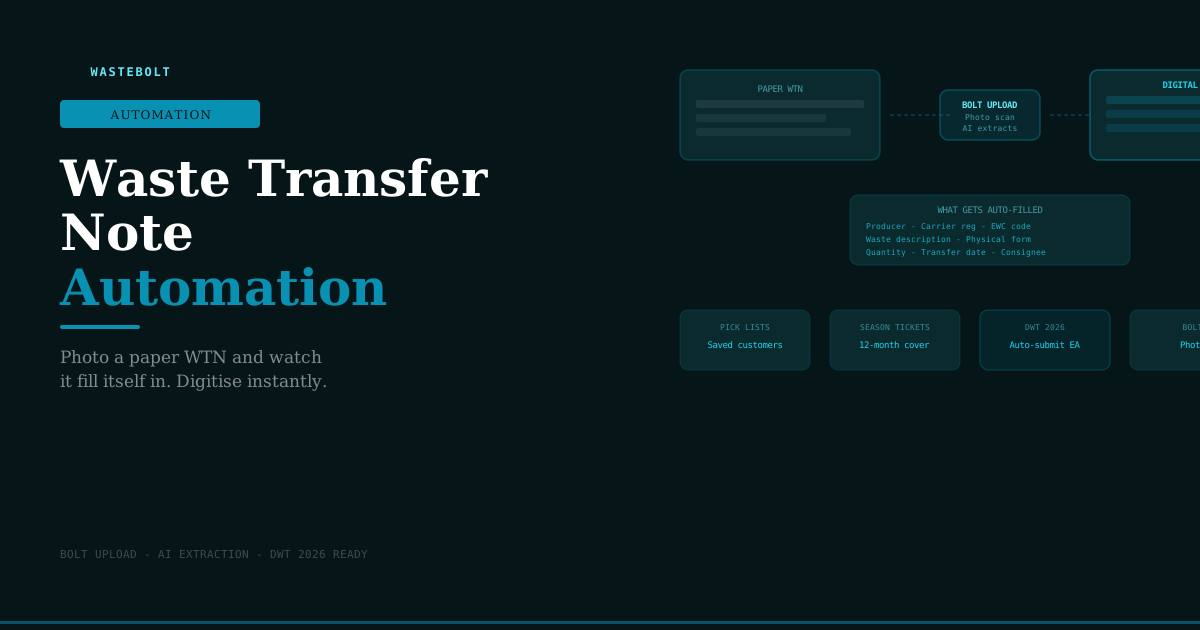
Bolt Upload changes this. Take a photo of the paper WTN on your phone. AI extracts all the key fields — producer details, carrier registration number, EWC code, waste description, weights, transfer date, consignee details — and populates a digital WTN in Wastebolt automatically.
What takes 10–15 minutes of manual data entry takes under 30 seconds with Bolt Upload. The result is a searchable, cloud-stored digital record that can be submitted to the DWT platform directly.
What gets extracted automatically:
- Producer name and address
- Carrier name, registration number, and vehicle reg
- Consignee name and permit number
- EWC code and waste description
- Physical form and containment method
- Quantity and weight
- Transfer date
For businesses receiving large volumes of incoming WTNs — transfer stations, MRFs, composting sites — this removes the single biggest manual bottleneck in waste documentation.
2. Pick-List Prefilling
For carriers and producers creating WTNs themselves, the biggest time sink is re-entering the same customer, carrier, and waste type information every single time.
Pick-lists solve this. You save your regular customers, carriers, vehicles, and waste types once. When creating a new WTN, you select from the pick-list and the relevant fields populate instantly.
For a skip hire company with 30 regular customers, a typical WTN goes from 8–10 minutes of data entry to under 2 minutes — most of which is the signature.
Pick-list entries store:
- Customer name and full address
- Carrier name, registration number, and common vehicle registrations
- Waste type descriptions and EWC codes used regularly
- Common containment methods and physical forms
- Recovery/disposal codes
3. Season Tickets
Where the same type of waste moves between the same producer and the same carrier regularly, a Season Ticket replaces individual WTNs for up to 12 months. The WTN is completed once, signed by all parties at the outset, and covers all qualifying collections within the period.
Each individual collection still requires a docket — recording the date, vehicle, and weight — but the full WTN documentation is done once rather than repeatedly.
When to use season tickets:
- Skip hire companies with regular commercial customers
- Construction sites with ongoing contracts for weekly waste removal
- Manufacturers with daily or weekly collections of the same waste type
- Retail chains with regular cardboard or packaging collections
A business with 15 regular customers on season tickets instead of individual WTNs eliminates 15 full WTN completions per collection cycle.
4. Automatic DWT Submission
From October 2026, waste receiving sites must report all incoming waste movements digitally to the Environment Agency's Digital Waste Tracking platform. This applies to transfer stations, MRFs, composting facilities, treatment plants, and all other permitted receiving sites.
Without automation, this means manually entering every WTN's data into the DWT platform — essentially creating the same record twice. With Wastebolt's DWT integration, submission happens automatically from the digital WTN data already captured. No re-entry. No additional step.
The data fields required by the DWT API are the same fields already on a WTN — producer, carrier, EWC code, waste description, weights, transfer date. Businesses that automate their WTN creation before October 2026 will transition to mandatory DWT reporting with zero additional effort.
The Paper WTN Problem
Before explaining automation further, it's worth being specific about what manual WTN processes actually cost.
Time cost per WTN on paper:
- Complete the note by hand: 8–12 minutes
- Chase carrier signature if not present: 5–10 minutes (often more)
- Chase consignee return copy: 1–3 days
- File the completed note: 2–3 minutes
- Retrieve during inspection: 5–20 minutes searching
Total per WTN: 15–50 minutes from creation to filing
For a carrier doing 5 collections per day, 5 days per week — that's 25 WTNs per week. At 30 minutes each, that's 12.5 hours per week of WTN administration. At 20 minutes each, it's still 8 hours.
Compliance risk on paper:
- Missing signatures are common — especially the consignee return copy
- Lost or damaged notes create unverifiable gaps in the audit trail
- No validation means wrong EWC codes and vague descriptions go unnoticed
- Retrieval during an EA inspection under time pressure is stressful and unreliable
What Digital WTN Automation Looks Like in Practice
Here's a typical journey for a skip hire company doing 15 collections per day with Wastebolt automation:
Before the collection: Driver opens Wastebolt on their phone. Selects the customer from the pick-list — name, address, and regular waste type auto-populate. Confirms the vehicle reg and adds the estimated weight. WTN created in under 90 seconds.
At the collection: Customer signs on the driver's phone screen. Digital signature captured, timestamped.
After the collection: Driver takes the skip to the transfer station. Consignee signs on receipt. PDF automatically emailed to customer, carrier company, and transfer station. WTN stored in Wastebolt cloud with full search capability.
At month end: Admin exports all WTNs for the month as a PDF or CSV in 30 seconds. No manual compilation.
From October 2026: Every WTN is automatically submitted to the EA's DWT platform on receipt at the transfer station. No additional action required.
WTN Automation and the Hazardous Waste Workflow
For businesses handling hazardous waste, the manual documentation burden is even heavier — Hazardous Waste Consignment Notes have additional required fields including HP codes, POPs declarations, consignment note codes, and stricter signature requirements.
Automation handles the additional complexity in exactly the same way:
- HP codes and POPs data stored and selected from pick-lists
- Consignment note codes generated automatically
- Return copy workflow automated — consignee signs digitally, copy distributed to producer automatically
- 3-year retention handled automatically in cloud storage
Getting Started with WTN Automation
Step 1: Try the free WTN generator wastebolt.app/free-wtn-generator — no account needed. Get a feel for digital WTN creation before committing to anything.
Step 2: Start a free trial wastebolt.app/register — 7-day free trial, no credit card. Set up your first pick-lists and create a WTN end-to-end. See how long it takes versus paper.
Step 3: Set up pick-lists and season tickets The biggest time saving comes from pick-lists. Spend 30 minutes adding your regular customers, carriers, and waste types and the per-WTN time drops immediately.
Step 4: Prepare for DWT 2026 Businesses already using digital WTNs will connect to the mandatory DWT platform with no additional setup. Businesses on paper will need to transition their entire workflow under a mandatory deadline — significantly more disruptive.
Frequently Asked Questions
How accurate is the AI extraction from paper WTNs? Bolt Upload's extraction accuracy is high for clear, legible documents. Handwritten notes are read accurately where the handwriting is reasonably clear. Fields that can't be read confidently are flagged for manual review rather than auto-filled with an incorrect value.
Can I automate WTNs if my customers still use paper? Yes. Bolt Upload is designed exactly for this scenario. Your customers continue using paper; you photograph the note and it becomes a digital record in Wastebolt automatically.
Do pick-lists work for construction sites where the customer address changes? Pick-lists save the customer organisation details. The site address for a particular job can be entered or amended when creating the WTN. This is common for construction companies working across multiple sites.
Does automation work for season tickets? Yes. Season tickets are created once in Wastebolt with all parties' details and the waste type covered. Each subsequent collection generates a docket linked to the season ticket. The system tracks whether collections fall within the season ticket period and waste type.
Will automation handle the DWT 2026 submission automatically? Yes. Wastebolt submits WTN data directly to the EA's DWT API. Once connected, every qualifying movement is reported automatically without additional manual action.
Last updated: May 2026.