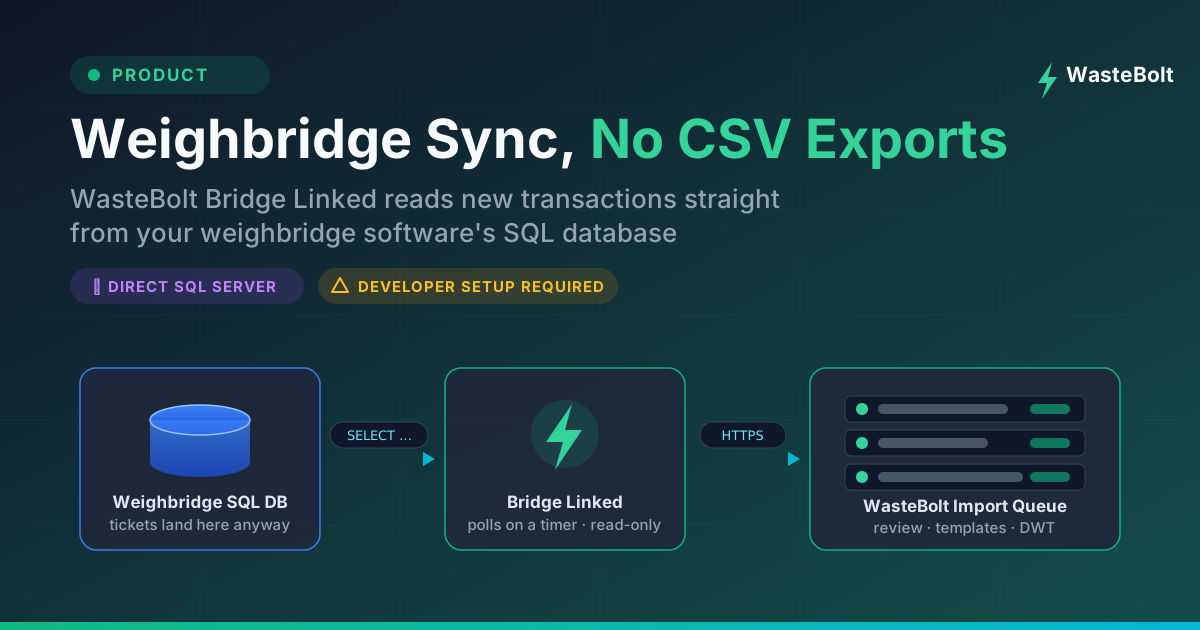
Most weighbridge software in the UK runs on the same foundation: a Microsoft SQL Server database quietly recording every ticket, weight and vehicle that crosses the bridge. WasteBolt Gatehouse SQL Server Sync taps into that directly. It's a small Windows desktop app that reads new completed transactions straight out of your weighbridge software's database and stages them in your WasteBolt Import queue — automatically, on a timer, with no exports and no re-keying.
This post is an overview of what Gatehouse SQL Server Sync does and, just as importantly, what you'll need in place before setting it up.
What Gatehouse SQL Server Sync Actually Does
Gatehouse SQL Server Sync runs on a Windows PC (usually the weighbridge office machine) and, every few minutes, asks your weighbridge database one question: "any new transactions since the last one I saw?"
When there are, it maps them to WasteBolt's fields and stages them in your Import queue — the same place your team already reviews incoming records, applies Import Templates to resolve producer, carrier and consignee roles plus EWC codes, and approves them into waste movements ready for Digital Waste Tracking.
A few things worth knowing about how it behaves:
- It's read-only. Gatehouse SQL Server Sync only ever runs a SELECT query against your weighbridge database. It never writes to it, changes it, or deletes from it. We recommend giving it a dedicated read-only SQL login for extra peace of mind.
- It never duplicates. It tracks the last transaction ID it synced and checks incoming ticket IDs against what's already in WasteBolt, so re-running a sync can't create the same record twice.
- It starts where you tell it. A "Start from now" option skips historical records so you begin syncing from today, rather than importing years of old tickets.
- You control the pace. The poll interval is yours to set — every 10 minutes suits most sites.
Who It's For
Gatehouse SQL Server Sync is built for sites where:
- The weighbridge software stores data in Microsoft SQL Server (including the free SQL Server Express editions many systems ship with)
- The software has no usable export feature — or you'd simply rather skip the export step entirely
- You have access to IT support, a developer, or your weighbridge vendor for the initial setup
That last point matters, so let's be upfront about it.
What Setup Requires — Honestly
Every weighbridge system stores its data differently: different table names, different column names, different database structures. Because of that, Gatehouse SQL Server Sync doesn't try to guess your schema. Instead, you supply a SQL query that tells it exactly where your transactions live and which columns hold the vehicle reg, the net weight, the account name and so on.
Writing that query is a one-off job, but it's a technical one. In practical terms you'll need:
- Someone comfortable with SQL Server — your IT contact, a developer, or your weighbridge supplier. They'll write a SELECT query that renames your database's columns to WasteBolt's standard names and includes a placeholder for the last-synced ID.
- The database connection details — server instance name, database name, and a SQL login (read-only recommended) or Windows Authentication.
- A Windows PC that can reach the database — usually the same machine the weighbridge software runs on.
- A WasteBolt Pro account (or above) — Gatehouse SQL Server Sync is available on Pro and Enterprise plans, and signs in with the same email and password you use on the website.
With those in place, setup typically takes 15–30 minutes: enter the connection details, test the connection, paste in the query, choose a poll interval, pick your starting point, and switch on auto-poll. The full technical detail — including the query rules and a real working example — is in our Gatehouse SQL Server Sync help guide.
A note on support
We'll gladly help with everything on the WasteBolt side: installing the app, signing in, the Import queue, templates and DWT submission. But because every weighbridge database is different, we can't — within reason — write or debug the SQL query for your specific system, or troubleshoot your SQL Server, drivers or network. That's the part your IT contact or weighbridge vendor owns, and it's why we describe Gatehouse SQL Server Sync as a developer-assisted setup rather than a plug-and-play one.
Already Using WasteBolt Gatehouse?
If WasteBolt Gatehouse's CSV watch folder is already moving your weighbridge data into WasteBolt via its watched-folder approach, you don't need Gatehouse SQL Server Sync — both feed exactly the same Import queue, and there's no advantage to switching a setup that works. Gatehouse SQL Server Sync exists for the sites the CSV watch folder mode can't reach: software with no export feature, or teams that want the export step gone. If you're weighing up the two, the help centre guide includes a side-by-side comparison.
How to Get Gatehouse SQL Server Sync
Gatehouse SQL Server Sync isn't a public download. It's available on Pro and Enterprise plans, and because setup needs developer involvement we supply it directly — we'll talk through your weighbridge system and requirements first, make sure it's the right fit, and then send you the installer.
Interested? Get in touch with the WasteBolt team — have your IT or weighbridge vendor contact details to hand, and we'll take it from there.