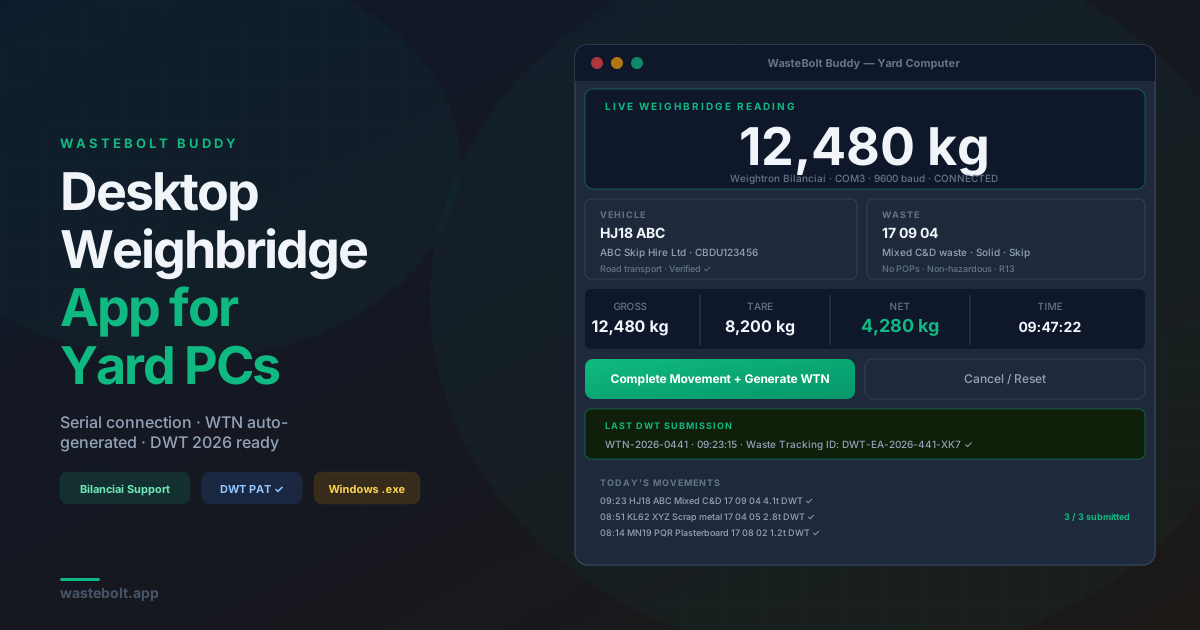
What Is WasteBolt Buddy?
WasteBolt Buddy is a desktop application that connects your physical weighbridge directly to your WasteBolt account. It runs as a lightweight Windows executable on your yard office computer, reads live weight data from your scale indicator, and pushes that data into WasteBolt where it generates Waste Transfer Notes and submits movements to the Environment Agency's Digital Waste Tracking platform.
It is built for the gap that most waste software misses — the small to medium-sized transfer station, recycler, or skip hire depot that has a physical weighbridge but cannot justify the cost or complexity of enterprise weighbridge software. If you have a scale with a serial output and a yard computer, WasteBolt Buddy works.
The Problem It Solves
A standard weighbridge setup at a small transfer station typically looks like this:
- Vehicles drive on the weighbridge
- The scale indicator displays gross and tare weights
- A yard operative writes them on a docket or types them into a spreadsheet
- Someone in the office transfers that data into a WTN manually
- At the end of the week or month, someone tries to reconcile dockets with WTNs
Every step in that chain is manual, slow, and prone to error. The wrong EWC code gets entered. A docket goes missing. A WTN gets completed days after the actual transfer. The audit trail is patchy.
From October 2026, that process also needs to feed the EA's Digital Waste Tracking platform — adding another manual step if nothing changes.
WasteBolt Buddy removes the manual steps between the weighbridge and the compliance record.
How It Works
1. Install on your yard computer
WasteBolt Buddy installs as a single .exe file — no IT team required, no complex setup. Run the installer, log in with your existing WasteBolt account credentials, and it connects to your WasteBolt data immediately.
2. Connect to your weighbridge Buddy connects to your scale indicator via a standard serial (COM) port connection. It supports Weightron Bilanciai indicators and any scale that outputs standard serial weight data. The connection is configured once — port number and baud rate — and Buddy reads live weight from that point on.
3. Log each vehicle When a vehicle arrives, the yard operative opens Buddy on the yard computer. They select or enter:
- Vehicle registration
- Carrier details (pulled from your WasteBolt pick-list)
- Waste type and EWC code
- The live gross weight is read directly from the scale
When the vehicle exits, the tare weight is captured. Net weight is calculated automatically.
4. WTN generated automatically
Buddy creates the Waste Transfer Note in WasteBolt using the movement data. The WTN is stored in your Compliance Hub with all three parties' details, the weight data, and a timestamp. A PDF is saved locally to ~/WasteBolt_WTNs/ and is also available in WasteBolt's cloud storage.
5. DWT submission If your site is a permitted waste receiver, Buddy submits the movement to the EA's Digital Waste Tracking platform automatically. The Waste Tracking ID returned by the DWT platform is stored against the movement record — your proof of compliance.
Supported Weighbridges
WasteBolt Buddy currently supports:
Weightron Bilanciai indicators via serial COM port connection. The connection uses a standard baud rate (default 9600) and the weight parser handles the standard Bilanciai serial output format. If your indicator outputs a non-standard format, the parser can be adjusted.
Any weighbridge with serial output — if your indicator sends weight data over a serial port, Buddy can be configured to read it. The simulated scale mode lets you test the full workflow without a physical scale connected, which is useful for setup and training before go-live.
If you are unsure whether your existing weighbridge is compatible, contact the WasteBolt team with the make and model of your indicator and we can confirm.
What Gets Generated
For each weighbridge movement, WasteBolt Buddy creates:
A Waste Transfer Note containing:
- Producer, carrier, and receiver details from your WasteBolt pick-lists
- EWC code and waste description
- Gross, tare, and net weight from the physical scale
- Transfer date and time (automatic)
- Legislative country and R/D code
A local PDF saved to ~/WasteBolt_WTNs/ on the yard computer — immediately available to print or email without needing internet access.
A cloud record in your WasteBolt Compliance Hub — searchable by date, vehicle, carrier, or EWC code, accessible from any device.
A DWT submission to the EA platform — the Waste Tracking ID is stored against the record as proof of submission.
Who It Is For
Small to medium transfer stations that have a physical weighbridge and need to meet the October 2026 DWT mandate without replacing their entire weighbridge system. Buddy works alongside existing weighbridge hardware — you are not buying a new scale or replacing the indicator.
Skip hire companies with a tip site that take vehicles over the weighbridge before and after tipping. Buddy captures both axle weights and generates the WTN from that data.
Recyclers and processors receiving multiple vehicle loads per day who need accurate weight capture, WTN generation, and DWT submission without double-entry.
Any site currently using paper dockets and a manual spreadsheet to record weighbridge movements — Buddy replaces both with a single system that generates compliant documentation automatically.
Running on a Yard Computer
Buddy is designed to run on the kind of computer that lives in a yard office — not a high-spec machine, not always connected to fast internet, sometimes running older Windows versions.
The application installs as a single Windows executable built with PyInstaller. It does not require Python to be installed on the target machine. The .exe is self-contained and runs on Windows 10 and above.
For sites with poor internet connectivity, Buddy queues DWT submissions and retries automatically when a connection is available. WTN PDFs are always saved locally first, so the paper record is never dependent on internet access.
October 2026 — Why This Matters Now
From October 2026, every permitted waste receiving site in England, Wales, and Northern Ireland must submit movement data to the EA's Digital Waste Tracking platform on the day of receipt. Manual spreadsheet submissions are a temporary fallback that Defra has confirmed will be withdrawn.
For sites currently running on paper dockets and spreadsheets, the October 2026 deadline is a hard stop. WasteBolt Buddy provides the automated submission route from existing weighbridge hardware — no enterprise software contract, no bespoke integration project, no new hardware.
WasteBolt has completed the EA's Production Approval Test (PAT) process. The DWT integration is live and validated. Sites using Buddy are already DWT-compliant.
See our weighbridge bridging software guide for more on how bridging software connects existing weighbridge systems to the DWT platform, and our DWT software guide for small waste receivers for the full picture of what the mandate requires.
Getting Started
WasteBolt Buddy is available to WasteBolt account holders. Contact the team at team@wastebolt.app to discuss your weighbridge setup and get access to the installer.
A 7-day free trial of WasteBolt is available at wastebolt.app/register — no credit card required. During the trial you can test Buddy in simulated scale mode to see the full workflow before connecting your physical weighbridge.
Frequently Asked Questions
Does WasteBolt Buddy work with my existing weighbridge? Buddy supports any weighbridge with a serial COM port output. Weightron Bilanciai is the primary tested indicator. Contact the team with your indicator make and model to confirm compatibility before purchasing.
Do I need to replace my weighbridge to use Buddy? No. Buddy connects to your existing scale indicator via a serial cable. You are not replacing the weighbridge or the indicator — Buddy sits alongside the existing hardware and reads from it.
What happens if the internet goes down? WTN PDFs are saved locally to the yard computer immediately, so the paper record is always available. DWT submissions are queued and sent automatically when connectivity is restored.
Can I use Buddy without a physical weighbridge? Yes. Buddy includes a simulated scale mode that lets you enter weights manually. This is useful for training, testing the workflow, or for sites that weigh vehicles using a third-party slip rather than an on-site weighbridge.
Is Buddy included in my WasteBolt subscription? Contact the team to discuss Buddy access. It is available to WasteBolt account holders with a compatible setup.
What Windows versions does Buddy support?
Windows 10 and above. The application installs as a self-contained .exe — no Python installation required on the target machine.
Last updated: June 2026. WasteBolt Buddy supports Weightron Bilanciai and compatible serial output weighbridges. Contact team@wastebolt.app for compatibility queries.