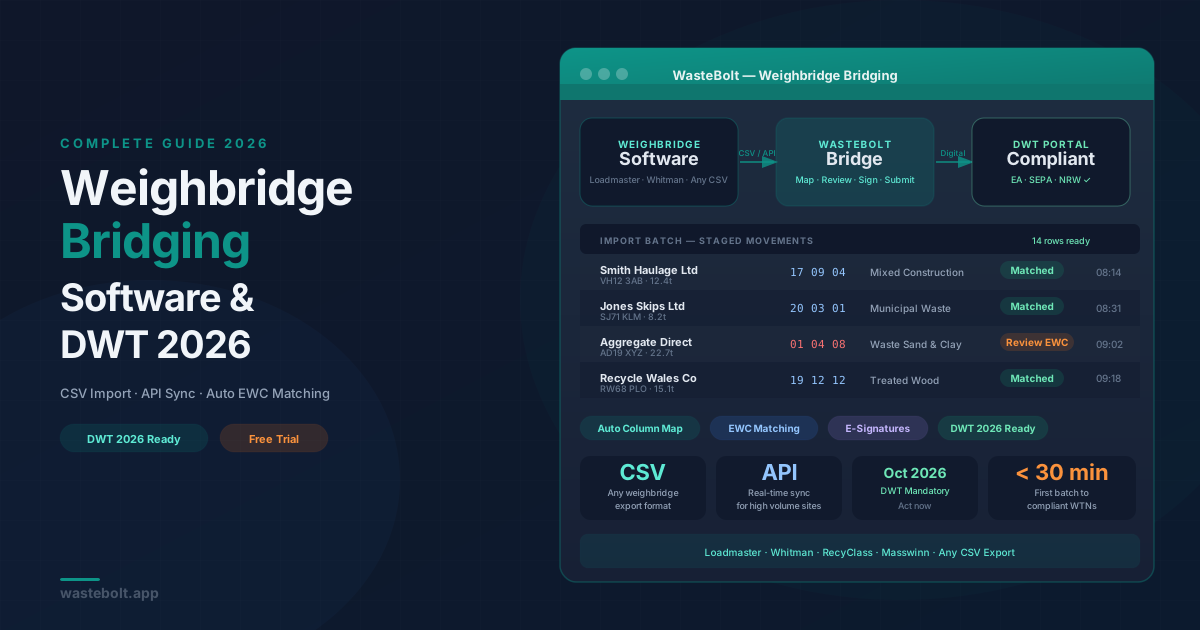
If your site runs a weighbridge, you already have a detailed record of every load that crosses it — tonnages, vehicle registrations, materials, customers. The problem is that record lives inside your weighbridge software, and from October 2026 it also needs to live inside the Environment Agency's Digital Waste Tracking (DWT) portal. Getting data from one place to the other without re-keying every movement is exactly what weighbridge bridging software solves.
What Is Weighbridge Bridging?
Weighbridge bridging is the process of automatically transferring transaction data from your weighbridge software into a waste compliance system that can generate Waste Transfer Notes (WTNs), apply EWC codes, capture e-signatures, and submit movements to the DWT portal — without your team manually re-entering every load.
Think of it as the missing link between your weighbridge and digital compliance.
The Problem: Your Weighbridge Software Won't Be DWT-Ready by Default
Most weighbridge platforms — Loadmaster, Whitman, RecyClass, Masswinn, and others — are excellent at what they were built to do: record weights accurately, manage vehicle queues, and produce weight tickets. They were not built to generate legally compliant digital WTNs or submit data to an EA-approved DWT portal.
From October 2026, every controlled waste movement in the UK must be tracked digitally. That means every load crossing your weighbridge needs:
- A digital Waste Transfer Note with EWC codes
- Electronic signatures from the relevant parties
- Submission to the EA, SEPA, or NRW DWT system
Your weighbridge software will not do this automatically. Without a bridging solution, your team faces two bad options: manually re-key every movement into a DWT system (time-consuming and error-prone), or risk non-compliance and enforcement action.
The Two Bridging Methods
Method 1: CSV Export and Import
This is the most accessible method and works with virtually every weighbridge platform on the market.
How it works:
- At the end of a session or day, export your weighbridge transactions as a CSV file — most platforms have this as a standard feature
- Upload the CSV into WasteBolt's import tool
- WasteBolt auto-maps your columns to the correct WTN fields (waste type, weight, vehicle, customer, date)
- You review the staged movements, apply or confirm EWC codes, and approve
- WTNs are generated, e-signatures are requested, and movements are logged for DWT submission
Column mapping templates save your column layout the first time, so future imports are a single click — upload and approve.
Who it suits: Sites that process dozens to hundreds of movements per day and want a low-friction bridge without IT changes or software integrations.
Method 2: API Integration
For higher-volume sites or those wanting real-time sync, WasteBolt's API allows your weighbridge software (or a middleware layer) to push movement data directly into WasteBolt as each transaction completes.
How it works:
- Your weighbridge software or IT team configures a webhook or scheduled API call to WasteBolt's REST endpoint
- Each movement is received, validated, and staged automatically
- EWC codes are matched against your pick list, vehicle and customer details are auto-populated
- The movement is queued for e-signature and DWT submission with minimal human input
Who it suits: Large transfer stations, MRFs, and quarries processing thousands of movements per month where manual CSV export is too slow.
How WasteBolt Weighbridge Bridging Works in Practice
Step 1 — Upload or Sync Your Data
Export your weighbridge CSV and drag it into WasteBolt's import screen, or let the API push data automatically. WasteBolt accepts any column order and remembers your mapping after the first import.
Step 2 — Auto-Mapping and EWC Matching
WasteBolt reads your material descriptions and attempts to match them to EWC codes based on your saved pick list. Where it cannot match automatically, it flags the row for your review — no movement slips through without a code.
Step 3 — Review the Staged Batch
Before any WTN is generated, you see a clean summary of all staged movements: customer, vehicle, weight, EWC code, waste description. Edit any row, bulk-apply a correction, or reject individual movements that need re-checking.
Step 4 — Generate WTNs and Collect Signatures
Approve the batch and WasteBolt generates individual WTNs for each movement. E-signature requests are sent to the relevant parties — your weighbridge operator, the carrier, or the consignee — via a signing link that works on any device.
Step 5 — DWT Submission
Once signed, movements are submitted to the EA, SEPA, or NRW DWT portal. All records are stored in WasteBolt's searchable archive — retrievable in seconds during an inspection.
Who Needs Weighbridge Bridging?
This workflow is particularly valuable for:
Quarries and aggregates sites — high daily movement volumes, mix of inert and controlled waste, multiple carriers per day.
Materials recovery facilities (MRFs) — complex material streams with multiple EWC codes per session, tight EA reporting requirements.
Waste transfer stations — receiving movements from multiple producers, needing WTNs for every intake.
Skip hire companies with weighbridges — currently using a weighbridge to ticket skips at the tip face, now needing those tickets to become digital WTNs.
Recycling centres — processing diverse waste types, needing EWC code accuracy across every load.
Inert waste landfills — high tonnage, regular EA inspections, audit trail critical.
What Happens Without a Bridging Solution?
Sites that don't bridge their weighbridge data face a stark choice from October 2026:
Manual re-entry. A weighbridge operator processes 200 loads per day. Each load requires a WTN with EWC code, vehicle, customer, weight, and e-signature. Without bridging, someone types every field by hand — slow, expensive, and prone to error.
Non-compliance. Skip manual entry, and you're operating without digital waste tracking in breach of the new regulations. EA enforcement for non-compliance includes formal warnings, fixed penalties, and in serious cases, suspension of environmental permits.
Operational bottlenecks. A manual process creates a queue at the weighbridge and slows vehicle turnaround — directly affecting your site's throughput.
Common Weighbridge Platforms WasteBolt Works With
WasteBolt's CSV importer is format-agnostic — if your weighbridge software can export a CSV (and they all can), WasteBolt can import it. We have tested column mapping templates for:
- Loadmaster — standard transaction export
- Whitman — daily summary and per-ticket exports
- RecyClass — material stream reports
- Masswinn — vehicle and customer transaction exports
- Any custom or in-house weighbridge system with CSV export
If you use a platform not listed here, WasteBolt's column mapper lets you configure the mapping manually in under five minutes and saves it for all future imports.
DWT 2026: The Deadline You Can't Ignore
The UK government's Digital Waste Tracking mandate comes into force in October 2026. From that date, paper WTNs are no longer legally sufficient for controlled waste movements. All movements must be recorded, signed, and submitted digitally.
For weighbridge sites, this means the manual workflow that has worked for years — print ticket, get wet signature, file paper — will not be compliant. The question is not whether to bridge your weighbridge data, but how soon.
Sites that start now have time to:
- Map their weighbridge columns correctly
- Train their team on the new workflow
- Run parallel processing (paper and digital) during transition
- Iron out EWC code gaps before the deadline
Sites that wait until 2026 will be doing all of that under pressure.
Getting Started
WasteBolt's weighbridge bridging is available on all paid plans. The CSV importer is live today — you can upload your first batch of movements and generate your first digital WTNs in under 30 minutes.
The 7-day free trial gives you full access to the importer, API credentials, column mapping templates, and the complete DWT submission workflow. No card required.
If you have a weighbridge and want to understand exactly how your platform's export maps to WasteBolt's fields, contact us and we'll walk through it with you.