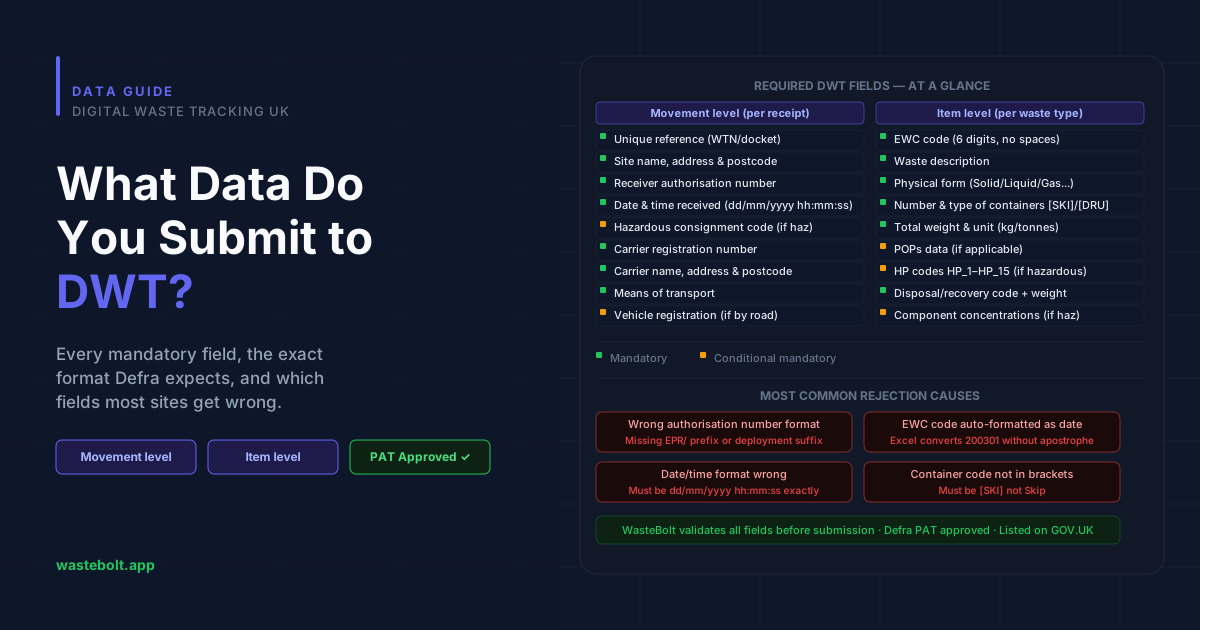
When a permitted waste-receiving site submits a waste receipt to Defra's Digital Waste Tracking (DWT) system, it needs to provide a specific set of data fields. Get them right and the submission is accepted immediately. Get them wrong — or miss a mandatory field — and the submission is rejected, leaving you non-compliant.
This post breaks down every field Defra requires, what it means, what format it needs to be in, and which fields most sites struggle with.
The two levels of DWT data
DWT submissions are split into two levels, both of which are required for every movement:
Movement level — the overall waste receipt: your site details, when the waste arrived, and the carrier who brought it. Think of this as the header record.
Item level — the waste itself: EWC code, description, weight, physical form, container type, and any hazardous or POPs classification. Multiple waste items can be linked to one movement.
Both levels must be linked using your unique reference number — typically your WTN or weighbridge ticket number.
Movement level — required fields
Your unique reference (mandatory)
Your internal reference for this waste movement. This is what links the movement record to the waste item record, so it must be consistent across both. A WTN number, docket number, or weighbridge ticket number all work. This becomes the basis for any future amendments.
Site name, address, and postcode (mandatory)
The name and full address of your receiving site. Must match the details on your environmental permit or waste management licence.
Receiver authorisation number (mandatory)
Your site's permit or exemption number. Defra uses this to link your submission to your registered site on the DWT system. The accepted formats vary by permit type:
- Standard format:
HP3456XX - With deployment number:
AB1234CD/D5678 - EPR format:
EPR/AB1234CD - Waste Management Licence:
EAWML999999orWML999999
If this number doesn't match what's on Defra's system exactly, the submission will fail.
Date and time received (mandatory)
The exact date and time the waste arrived at your site. For the spreadsheet route, the format must be dd/mm/yyyy hh:mm:ss in the London/Europe timezone — for example 01/01/2026 09:30:00. Any other format will cause rejection.
In WasteBolt, this is captured automatically when you record the movement.
Hazardous waste consignment code (conditional mandatory)
Required if the waste is hazardous. Must follow the format XXXXXX/YYYYY — six letters, a forward slash, then a five-character unique identifier using letters or numbers (no spaces or symbols). For example ABCDEF/A1234.
If you don't have a consignment code, you must provide one of these approved reasons:
NON_HAZ_WASTE_TRANSFER— non-hazardous waste transferNO_DOC_WITH_WASTE— no document arrived with the wasteHWRC_RECEIPT— household waste recycling centre receipt
You cannot write your own reason — it must be one of these exact strings.
Special handling requirements (optional)
Free-text field for handling instructions for waste that has the potential to cause harm. Required for certain hazardous waste types in practice, even if marked optional in the system.
Carrier registration number (mandatory)
The waste carrier's registered licence number. Required for all businesses and organisations that transport, buy, sell, or dispose of waste.
If the carrier doesn't have a registration number — which happens in specific legitimate circumstances — you must provide one of these approved reasons:
ON_SITE— movement within the same premisesHOUSEHOLD— householder transportONE_OFF— one-off transportMARINE— marine transport
Again, must be the exact string — no variations accepted.
Carrier organisation name, address, and postcode (mandatory)
The full legal name and business address of the carrier, not the driver's name or the vehicle's home address. Must be the registered business location.
Carrier contact email (optional)
The carrier's business contact email. Optional in the system but useful for audit purposes.
Means of transport (mandatory)
How the waste was transported. Accepted values are: Road, Rail, Air, Sea, Inland Waterway, Piped, or Other. Must match exactly — road (lowercase) will be rejected.
Vehicle registration number (conditional mandatory)
Required if the means of transport is Road. The vehicle registration plate of the lorry, wagon, or van that delivered the waste.
Broker or dealer details (optional)
If a waste broker or dealer was involved in the movement, you can record their organisation name, address, postcode, email, phone number, and registration number. All optional, but Defra may require this for certain regulated movements.
Item level — required fields
EWC code (mandatory)
The 6-digit European Waste Catalogue code that classifies the waste. Must be entered without spaces — 200301 not 20 03 01. You can submit multiple EWC codes for one movement by separating them with a semicolon.
If entering in a spreadsheet, you must prefix the code with a single apostrophe ('200301) to prevent Excel auto-formatting it as a date. In WasteBolt, EWC codes are selected from a searchable picker — no formatting issues.
Codes marked with an asterisk in the EWC list are classified as hazardous under Article 1(4) of Directive 91/689/EEC.
Waste description (mandatory)
A detailed description of the waste, including its physical characteristics, composition, and whether it is potentially hazardous. This should be more specific than just the EWC category — for example, not just "mixed waste" but "mixed municipal solid waste from household collections, primarily paper, plastic, and organic material."
Physical form (mandatory)
How the waste exists physically. Accepted values are: Gas, Liquid, Solid, Powder, Sludge, or Mixed.
Number of containers (mandatory)
How many containers the waste arrived in — for example, 1 skip, 3 drums, 12 bags. An integer value.
Type of containers (mandatory)
The container type using Defra's standard container codes. Accepted values include:
[BAG]Bag/Sack[BAL]Bale[BOX]Box, Carton, Crate[CAN]Can/Jerrycan[DRU]Drum (typically 205L)[IBC]Intermediate Bulk Container (typically 1000L)[LOO]Loose (no container)[ROR]Roll-on Roll-off container[SKI]Skip[TAN]Tanker/Tank[WBI]Wheelie Bin
The code must be entered in brackets exactly as shown. In WasteBolt, these are selectable from a dropdown — the correct code is applied automatically.
Total weight and unit (mandatory)
The weight of the waste in your chosen unit. Accepted units are Grams, Kilograms, or Tonnes. You must also indicate whether the weight is estimated (Yes) or actual (No).
POPs data (conditional mandatory)
If the waste contains Persistent Organic Pollutants, you must declare them. The entry format in the spreadsheet is: POP code, equals sign, concentration in mg/kg, semicolons between multiple entries — for example ALD = 50; PCDD_PCDF = 25.
POP codes come from Defra's reference list and include substances like ALD (Aldrin), PCB (Polychlorinated biphenyls), PFOS (Perfluorooctane sulfonic acid), and DECA BDE (Decabromodiphenyl ether), among others.
You must also indicate how you determined the POPs components: NOT_PROVIDED, PROVIDED_WITH_WASTE, GUIDANCE, or OWN_TESTING.
Hazardous waste flag and HP codes (conditional mandatory)
If the waste is hazardous, you must declare it and provide at least one Hazardous Property code (HP code). HP codes classify the type of hazard:
HP_1— ExplosiveHP_2— OxidisingHP_3— FlammableHP_4— IrritantHP_5— Specific target organ toxicityHP_6— Acute toxicHP_7— CarcinogenicHP_8— CorrosiveHP_9— InfectiousHP_10— Toxic for reproductionHP_11— MutagenicHP_12— Release of an acute toxic gasHP_13— SensitisingHP_14— EcotoxicHP_15— Waste capable of exhibiting a hazardous property not directly displayed
Multiple HP codes are separated by a semicolon: HP_3 ; HP_6.
You must also record the chemical or biological component name and concentration in the format Cadmium = 50; Trichloroethylene = 25, and indicate how you determined the hazardous components.
Disposal or recovery code and weight (mandatory)
The D or R code that describes what will happen to the waste at your site, paired with the weight allocated to that treatment method. The entry format is: D12 = 30 = kg = Estimate — code, weight, unit, and whether the weight is actual or estimated.
Multiple codes are separated by a semicolon: R13 = 500 = kg = Actual; D15 = 50 = kg = Actual.
For each EWC code, there must be at least one D or R code. The weight for all codes combined should equal the total weight of the waste item.
The fields most sites get wrong
From the spreadsheet's own guidance and the structure of its validation, the most common rejection causes are:
Authorisation number format — a missing EPR/ prefix or wrong deployment number suffix causes an immediate mismatch with Defra's site records.
Date and time format — any deviation from dd/mm/yyyy hh:mm:ss in the spreadsheet causes rejection. Entering 01/01/2026 without the time component will fail.
EWC code auto-formatting — Excel converts 200301 to a date unless prefixed with an apostrophe. Submissions with date-formatted EWC codes are rejected.
Container type codes — entering Skip instead of [SKI] will fail. The brackets and code must be exact.
Means of transport capitalisation — road instead of Road will fail.
Missing unique reference link — if the reference in Tab 7 (movement level) doesn't exactly match the reference in Tab 8 (item level), the records can't be linked and the submission is rejected.
How WasteBolt handles all of this
WasteBolt captures all of the above through validated forms, dropdowns, and searchable pickers — the correct format is enforced at the point of data entry, not discovered after submission failure.
EWC codes are selected from a searchable database. Container types are picked from a dropdown with the correct code applied automatically. HP codes, POPs data, and disposal codes are all captured in the hazardous WTN form and mapped to the DWT payload without any cell syntax.
Before submission, WasteBolt runs a pre-submission validation pass against every required field and flags anything missing or invalid in red or amber — so you fix it before it reaches Defra, not after.
WasteBolt is a DWT software provider, listed on GOV.UK. You can start a free 7-day trial or read our step-by-step credentials guide to get connected before October 2026.