The October 2026 Digital Waste Tracking mandate is causing real confusion in the skip hire industry. Do skip operators need to register? What data do you need to submit? Does every skip collection need reporting?
This post answers those questions specifically for skip hire and skip exchange businesses — covering what the mandate means for your operation and how WasteBolt handles DWT automatically alongside your existing waste transfer notes.
Does the October 2026 DWT mandate apply to skip hire companies?
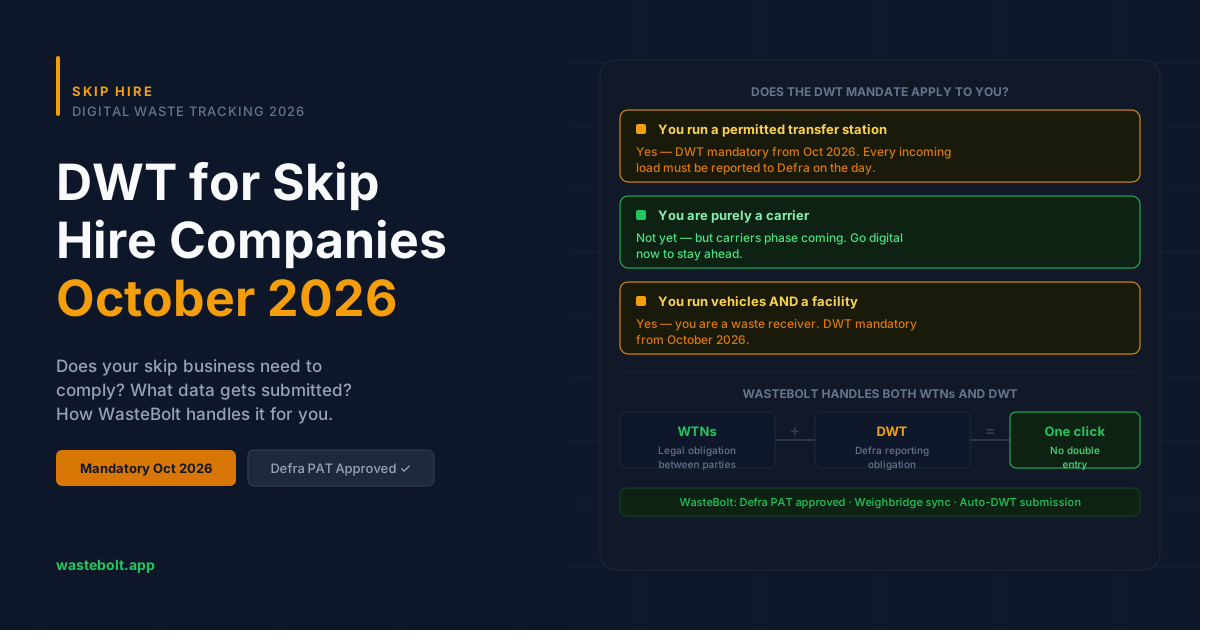
It depends on what your site does. The October 2026 mandate specifically covers waste receivers — sites holding an environmental permit or waste management licence that receive waste from third parties.
For skip hire businesses, that means:
If you operate a permitted transfer station or sorting facility that receives skips back from customers — yes, you are a waste receiver and the DWT mandate applies to you from October 2026. Every load received at your site needs to be reported to Defra digitally on the day of receipt.
If you are purely a carrier — collecting skips from customers and transferring them directly to a licensed facility — the October 2026 mandate does not yet apply directly to you. However, the receiving facility you deliver to will need to report your delivery, and the mandate is expected to extend to carriers in a later phase. Getting digitally compliant now puts you ahead.
If you do both — operate vehicles and a permitted facility — you fall into the receiver category and need to comply from October 2026.
What does DWT mean in practice for a skip hire operation?
For a permitted skip transfer station, DWT means every incoming load — every skip tipped at your facility — needs to be reported to Defra's platform on the day it arrives. The data required includes:
- Date of receipt
- Carrier name, address, and registration number (your own company in most cases)
- Vehicle registration
- EWC code for the waste in the skip
- Weight
- Recovery or disposal code
For skip hire businesses, the EWC code is usually one of the mixed waste codes — typically 20 03 01 (mixed municipal waste) for general skips, though the correct code depends on the waste stream. See our EWC codes guide for skip hire companies for a full breakdown.
How do waste transfer notes fit with DWT for skip hire?
Skip hire businesses already have a WTN obligation — every skip collection requires a waste transfer note between the producer (your customer) and the carrier. DWT is a separate, additional obligation to report receipt data to Defra. They are different requirements but they draw on the same underlying data.
This is why using software that handles both together is significantly more efficient than running separate systems. In WasteBolt, the data you already enter for a WTN — EWC code, weight, vehicle reg, waste description — is automatically mapped to the DWT submission. You don't fill anything in twice.
For skip businesses using season tickets for repeat customers, the same principle applies — season ticket dockets contain the data needed for DWT, and WasteBolt can use them to generate submissions.
How WasteBolt handles DWT for skip hire
WasteBolt is a DWT software provider, listed on GOV.UK's software provider list. Here's how skip hire businesses use it:
For standard skip collections:
- Driver completes a WTN or docket in WasteBolt on collection (or using Skippy quick-capture on mobile)
- When the skip is received back at your facility, the docket appears in your DWT submission queue
- WasteBolt validates the record — flags any missing fields in red or amber
- One click submits the receipt to Defra's platform
- Waste Movement ID returned and stored against the record
For weighbridge-based operations: If your facility uses a weighbridge, WasteBolt's WasteBolt Gatehouse can automatically import weighbridge CSV exports, map the loads to your WTN records, and queue them for DWT submission — removing manual re-entry entirely.
For high-volume facilities: WasteBolt's auto-DWT submission can be enabled to submit records automatically at a set time each day — suitable for transfer stations processing large numbers of loads without time to submit each one individually.
How to get set up before October 2026
If your skip hire business operates a permitted facility:
- Register your site at gov.uk/guidance/report-receipt-of-waste if you haven't already
- Get your Defra API credentials — Client ID and Client Secret — from the DWT portal after registration
- Connect WasteBolt — enter your credentials at Settings → Integrations and test the connection
- Start creating digital WTNs for every collection so the data flows into your DWT queue automatically
- Submit — from October 2026, submit each day's receipts to Defra through WasteBolt
Not sure where you stand? Take our free DWT Readiness Check — a 7-question quiz that gives you a personalised compliance score and tells you exactly what to do next.
Summary
- The October 2026 DWT mandate applies to skip hire businesses that operate a permitted receiving facility
- Every incoming load must be reported to Defra digitally on the day of receipt
- WasteBolt is listed on GOV.UK and handles both WTNs and DWT submissions in one platform — no double-entry
- The data you already capture for a WTN feeds directly into your DWT submission
- Setup takes minutes — start a free trial and be ready well before the deadline