Why Checking Matters Before Every Transfer
Under Section 34 of the Environmental Protection Act 1990, you have a legal Duty of Care to ensure your waste is only transferred to an authorised person. That means checking your waste carrier is registered — every time, not just the first time you use them.
Carrier registrations expire. A carrier who was registered when you first used them 18 months ago may no longer be. If waste is transferred to an unregistered carrier and that waste ends up fly-tipped or improperly disposed of, the Duty of Care breach is yours — even if you had no idea the carrier was unregistered.
This guide shows you exactly how to check, what to look for, and what to do if a carrier cannot provide a valid registration.
Step-by-Step: How to Check a Waste Carrier Registration
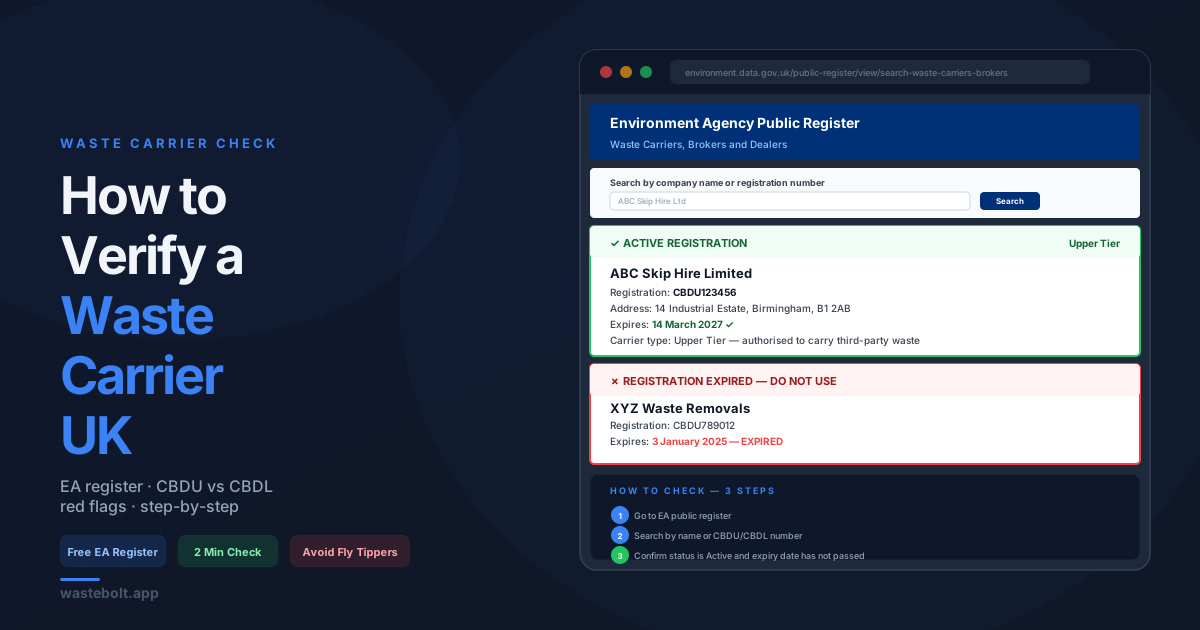
Step 1 — Go to the Environment Agency public register
The register is free, public, and maintained by the EA. Go to: environment.data.gov.uk/public-register/view/search-waste-carriers-brokers
For Scotland, use the SEPA register: sepa.org.uk/regulations/waste/waste-carriers
For Northern Ireland, use the NIEA register through the NI Environment Agency.
Step 2 — Search by company name or registration number
You can search by:
- Company or trading name — enter the carrier's business name as it appears on their headed paper or invoice
- Registration number — if the carrier has given you their CBDU or CBDL number, enter it directly for an exact match
Step 3 — Confirm the registration status
The result will show:
- Registration number (CBDU or CBDL prefix)
- Registered business name and address
- Registration tier (upper or lower)
- Expiry date — this is the critical field. Check it has not passed.
- Status — should show as Active
If the expiry date has passed or the status is not active, the carrier is not currently registered and you should not transfer waste to them until they provide an updated registration.
Step 4 — Record what you find
Note the registration number and expiry date on the WTN in Part B. This protects you if the carrier's registration is later found to have lapsed — you have documented that you checked and it was valid at the time of transfer.
CBDU vs CBDL — What the Registration Types Mean
Every registered waste carrier has a registration number with one of two prefixes:
CBDU — Upper Tier For businesses that carry waste as part of their main business activity — skip hire companies, waste management firms, hauliers carrying commercial waste. Upper tier registrations require more compliance checks and must be renewed every three years.
CBDL — Lower Tier For businesses that occasionally carry their own waste — a builder taking their own skip load to a tip, a landscaper removing garden waste they have generated. Lower tier registration is free and does not expire, but only covers carrying the business's own waste. A lower tier carrier cannot legally carry your waste.
What this means in practice: if a carrier offers to take your waste and only has a CBDL registration, they are not authorised to carry third-party waste. You need a CBDU carrier.
What to Do if a Carrier Is Not Registered
Do not transfer the waste. The legal liability for a Duty of Care breach sits with you as the producer the moment waste leaves your site with an unregistered carrier.
Ask the carrier for their registration number directly. A legitimate carrier will have it immediately available. Hesitation or inability to provide it is a red flag.
Give them a chance to show a current certificate. Registration certificates are issued by the EA and can be shown on request. If the carrier claims they have renewed but the register has not updated yet, ask for the renewal confirmation email or certificate from the EA.
If they cannot provide evidence of registration, do not use them. Find a registered alternative using the EA public register search — it lists all registered carriers by area.
Red Flags That May Indicate an Unregistered Carrier
Beyond a failed register check, watch for these warning signs when a carrier approaches you:
- Offers a significantly lower price than other carriers — unregistered operators cut costs by avoiding legal disposal routes
- Cannot provide a registration number when asked
- Offers to take waste "cash in hand" with no paperwork
- Does not provide a Waste Transfer Note or asks you to sign a blank one
- Refuses to say where the waste is going
- Vehicle is unmarked or in poor condition
See our full guide to identifying fly tippers and unregistered carriers for more detail on the warning signs.
Recording the Check on a Waste Transfer Note
When you complete a WTN, Part B captures the carrier's details:
- Carrier name and address — must match the registered business name on the EA register
- Registration number — enter the full CBDU or CBDL number including the prefix
- Vehicle registration — recommended for every transfer, required if the load is stopped for inspection
WasteBolt validates CBDU and CBDL registration number formats automatically and saves carriers to your pick-list so you only need to enter the details once. On repeat collections, the carrier details pre-fill from your saved pick-list in seconds.
How Often Should You Check?
Before every transfer with a new carrier — always check before the first collection.
At least annually for regular carriers — even carriers you use regularly should be checked periodically. Upper tier registrations expire every three years but can lapse or be revoked at any time.
Before any large or high-value collection — if a significant amount of waste is being collected, the stakes of a compliance failure are higher. Always check.
The EA register is updated in real time, so a check on the day of collection is the most reliable verification.
Frequently Asked Questions
Is the EA waste carrier register free to use? Yes. The Environment Agency public register is completely free to search and requires no login or account.
What if the carrier has a Scottish or Northern Ireland registration? Carriers registered in Scotland (with SEPA) or Northern Ireland (with NIEA) are valid for collections in their respective nations. For England and Wales collections, you need an EA registration. Some carriers hold registrations in multiple nations.
Can a sole trader be a registered waste carrier? Yes. Individual sole traders can register as waste carriers. Their registration will appear under their trading name or personal name on the EA register.
What is the penalty for using an unregistered carrier? As the waste producer, you can face a fixed penalty notice or prosecution for a Duty of Care breach. Fines can reach £5,000 in Magistrates Court with no upper limit in Crown Court. The carrier faces separate penalties for operating without registration.
How do I report a carrier I suspect is unregistered? Report to the Environment Agency on 0800 80 70 60 or via their online incident reporting form. If you witness fly-tipping in progress, this is the same number.
Last updated: June 2026. Register links correct as of June 2026 — EA, SEPA, and NIEA registers are updated in real time.