Why Unsigned WTNs Are a Real Compliance Problem
Ask most waste carriers how many of their completed WTNs are missing at least one signature and the honest answer is usually "quite a few." Ask them whether that matters and the answer is frequently "probably not."
It does matter. And here's why.
A Waste Transfer Note is the legal record of your duty of care under Section 34 of the Environmental Protection Act 1990. It documents that waste was transferred from a producer to a licensed carrier and then on to a permitted receiving site. All three parties — producer, carrier, and consignee — are required to sign the note.
An unsigned WTN is an incomplete WTN. It does not fully satisfy the duty of care documentation requirement. Specifically:
A missing producer signature means there is no documented confirmation that the person who generated the waste authorised its transfer and agreed that the information on the note is accurate.
A missing carrier signature means there is no documented confirmation that the carrier accepted responsibility for the waste during transport.
A missing consignee signature — the most commonly missing signature — means there is no documented confirmation that the waste arrived at its intended destination and was accepted. This is the most significant gap, because the consignee return signature is the only evidence that your waste ended up where it was supposed to go.
If the waste goes to the wrong place — or is fly-tipped by an unscrupulous carrier — the producer remains liable if they cannot demonstrate that proper documentation was completed. A WTN without a consignee signature does not close that liability.
Why Signatures Accumulate as a Problem
The signature problem is structural, not accidental. It stems from how waste transfers actually work.
The producer signs at collection. The carrier signs on the same visit. But the consignee signature happens later — when the vehicle arrives at the transfer station or recycling facility, often hours after the collection. On paper, getting that third signature back to the producer means posting or emailing a scanned copy. It frequently doesn't happen.
On busy sites with multiple drivers doing multiple collections per day, the backlog builds quickly. By the end of the month, a skip hire company or waste carrier can easily have 20, 30, or 50 completed WTNs missing the consignee signature — creating an audit gap that nobody has the time or the process to systematically chase.
The producer signature gap is rarer but happens on site visits where the customer wasn't available when the waste was collected, or where the collection happened out of hours.
The carrier signature gap is the least common — usually only missing where the WTN was completed in a hurry or the driver forgot.
Who Is Responsible?
All three parties have their own duty of care — which means all three are responsible for their own signature. But in practice, the producer and the carrier are typically the ones chasing the consignee, because the consignee return copy is the one that closes the loop.
The principal contractor on a construction site is responsible for ensuring WTNs are properly completed for all waste leaving site — including signatures from subcontractors and consignees.
For ongoing commercial relationships — a skip hire company with regular customers, a waste carrier with regular commercial collections — the administrative burden of chasing signatures on every WTN is one of the main arguments for moving to digital.
How Wastebolt's Missing Signatures Tool Works
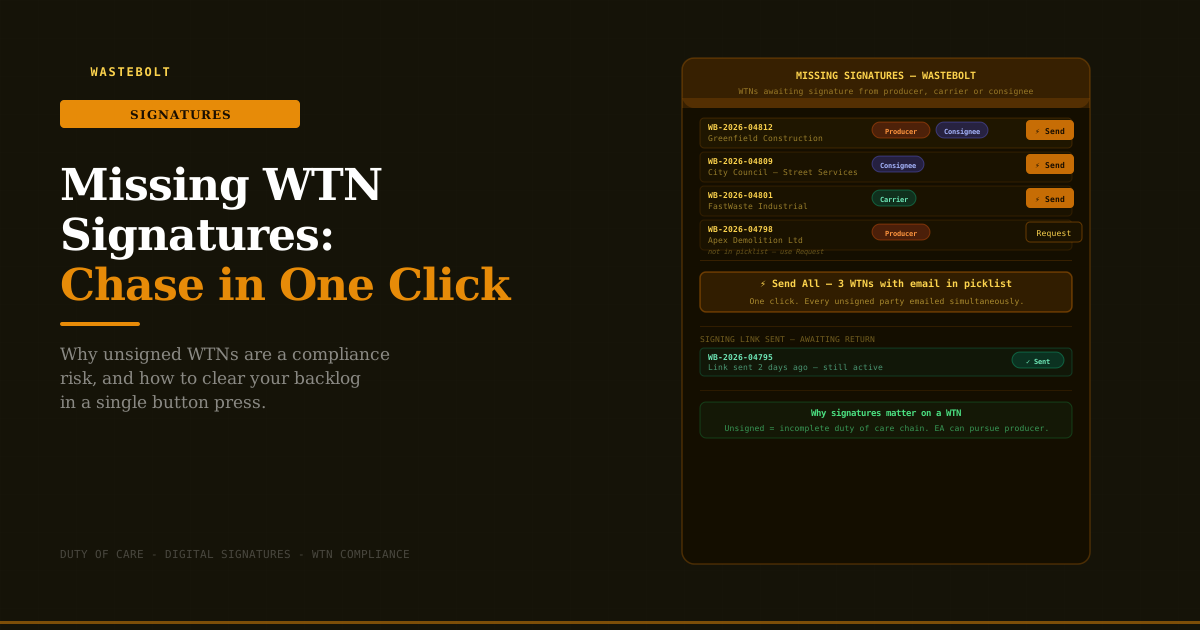
Wastebolt has a dedicated Missing Signatures page that surfaces every completed WTN with at least one signature still outstanding — and gives you a one-click route to chase all of them.
The Missing Signatures List
The page loads every non-draft, non-season-ticket WTN from your account where one or more of the three signatures is absent. For each WTN you can see:
- The WTN reference number
- The producer / customer name
- Colour-coded badges showing which parties are missing their signature:
- Orange — Producer not signed
- Blue — Consignee not signed
- Green — Carrier not signed
- Whether an email address is available for each unsigned party (pulled automatically from your customer pick-list)
- Whether a signing link has already been sent and when
Filtering
The list can be filtered by party — view only WTNs missing a Consignee signature, only those missing a Producer signature, or all at once. On a large account this makes it easy to focus on the most common gap (usually consignee) without being distracted by the others.
The Send Button — One WTN at a Time
Where an email address is found in your customer pick-list for the unsigned party, a Send button appears next to the WTN. One click:
- Creates a secure signing link for that WTN
- Emails it to all unsigned parties where an email is available
- Marks the WTN as "link sent" in the list with a timestamp
The recipient gets an email with a link that opens the WTN in a clean signing interface — they review the note and add their digital signature. No Wastebolt account required. No app download. The signature is attached to the WTN automatically.
The Send All Button — Clear the Backlog
This is the headline feature. The Send All button at the top of the page fires signing links to every unsigned party across every WTN in the list simultaneously — for all WTNs where an email address exists in the pick-list.
For a skip hire company with 25 WTNs missing a consignee signature, that's 25 signing emails sent in one button press rather than 25 individual chases. The progress updates in real time as each one goes out.
WTNs where no email is in the pick-list are excluded from Send All but remain in the list for manual follow-up using the Request button, which lets you enter an email address directly.
Signing Link Status
The list shows the status of any signing link already sent:
- Sent — link was dispatched and is still active
- Expired — the link has passed its expiry window (you can resend)
- Not requested — no link has been sent yet
This prevents double-sending to parties who have already received a link and may simply not have responded yet.
Why Email in the Pick-List Makes This Instant
The speed of the Send / Send All workflow depends entirely on having email addresses in your customer pick-list. When you add a customer to your Wastebolt pick-list, you can store their default email and a CC email. Those addresses are what the missing signatures tool uses to fire links automatically.
For regular customers — the businesses that appear on your WTNs week after week — setting up the email in the pick-list once means every future missing signature chase is instant, with no manual email entry required.
For customers not yet in the pick-list, the Request button opens a dialog where you can enter their email manually for that specific WTN. Adding them to the pick-list afterwards means the next time they appear, the automatic route is available.
Digital Signatures on WTNs — Are They Valid?
Yes. Electronic signatures are fully legally valid under the Electronic Communications Act 2000 and the Electronic Signatures Regulations 2002. A signature drawn on a touchscreen or submitted via a secure signing link carries the same legal weight as a handwritten signature, provided it reliably identifies the signatory and their intention to sign the document.
Digital signatures in Wastebolt are timestamped — the exact date and time of signing is recorded alongside the signature itself. This is actually stronger evidence than a paper signature, which has no automatic timestamp.
Building a Zero-Backlog Habit
The missing signatures tool is most valuable when used proactively rather than reactively. Rather than letting unsigned WTNs accumulate over weeks before clearing them in a batch, the most effective approach is a short weekly check:
At the end of each week: Open the Missing Signatures page. Filter to Consignee. Hit Send All. Done. Any consignee who received a collection that week and hasn't yet signed gets a prompt.
This turns what would otherwise be a significant monthly admin task into a two-minute weekly habit — and means the compliance record is consistently complete rather than perpetually in arrears.
For the small number of WTNs where the email is missing from the pick-list, a separate short chase — phone call or manual email — can follow. Adding the email to the pick-list as you go means the list of manual chases gets shorter every week.
What the Dashboard Tells You
Wastebolt's dashboard includes a "WTNs with missing signatures" count in the summary stats row — so the backlog is visible every time you log in, not just when you remember to check. The number is a live count of unsigned completed WTNs across your account.
Seeing the number go to zero after a Send All is one of those small but satisfying moments of compliance admin done properly.
Frequently Asked Questions
Does the consignee need a Wastebolt account to sign? No. The signing link opens in any browser — on a phone, tablet, or desktop. The consignee reviews the WTN details and draws or uploads their signature. No account or app installation needed.
How long are signing links valid? Signing links are active for a set period after being sent. If a link expires before the party signs, you can resend from the missing signatures list — the expired status will show in the Requested column.
What if a party signs on paper instead of digitally? If a consignee insists on signing a paper copy, that's their right — but the paper signature won't automatically appear in Wastebolt. You can manually mark the WTN as complete or upload a scanned copy of the signed note. For regular relationships, encouraging digital signing via the link is significantly more efficient for both parties.
Can I see which WTNs have already had a link sent? Yes. The Requested column in the list shows whether a signing link has been sent, when it was sent, and whether it's still active or has expired. This prevents accidentally double-sending to someone who is just taking a day or two to sign.
Does Send All send to all three parties or just the missing ones? Send All only sends to parties who are missing their signature. Parties who have already signed are not contacted.
What happens once the signature is received? When the recipient signs via the link, their signature is attached to the WTN in Wastebolt. The WTN disappears from the missing signatures list automatically. A PDF with all signatures is generated and stored.
Start a free trial → — no credit card required.
Last updated: May 2026. Legal basis: Environmental Protection Act 1990 · Duty of Care Regulations 1991 · Electronic Communications Act 2000 · Electronic Signatures Regulations 2002.