Introducing WasteBolt Gatehouse — Weighbridge Integration Rebuilt
WasteBolt Gatehouse replaces WasteBolt Bridge. It's a rebuilt Windows desktop app that brings three ways to get weighbridge data into WasteBolt — automatically or manually — all from a single download.
What is WasteBolt Gatehouse?
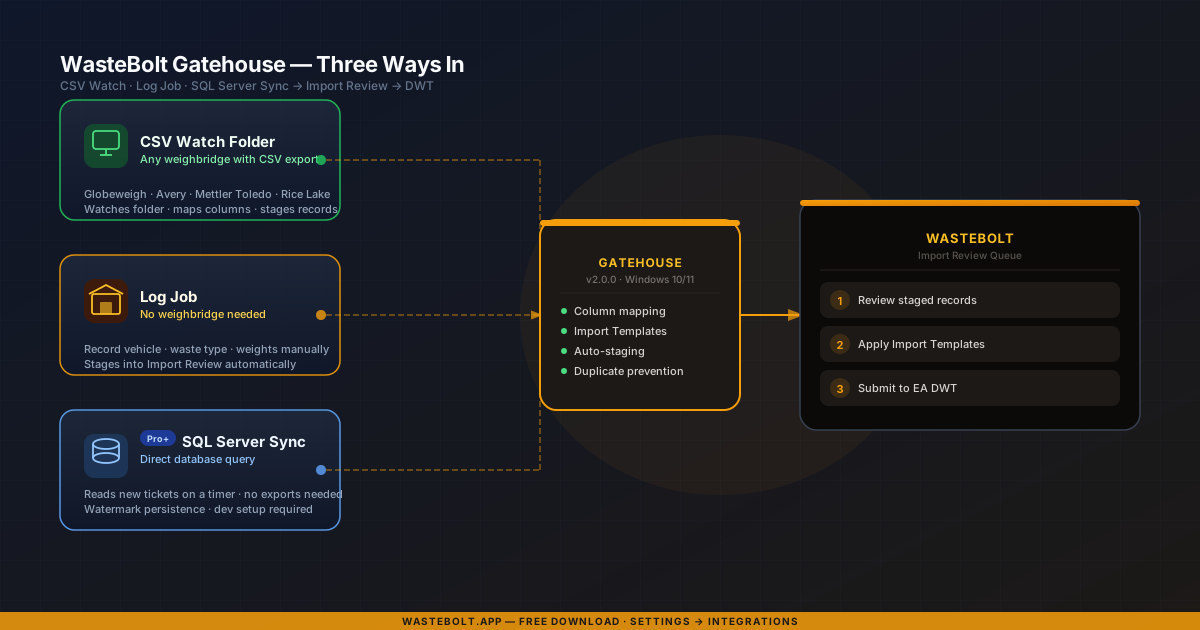
WasteBolt Gatehouse is a free Windows desktop app for yard office computers. It acts as the connection point between your weighbridge operation and WasteBolt — picking up load data automatically and staging it into the Import Review queue, ready to be approved as Waste Transfer Notes and submitted to the EA's Digital Waste Tracking service.
The key change from the old WasteBolt Bridge app is scope. Bridge only did one thing: watch a folder for CSV exports. Gatehouse does three — and for sites without a weighbridge, you can now record loads directly in the app without any hardware at all.
Three data sources, one app
The same core feature from WasteBolt Bridge. Point Gatehouse at the folder your weighbridge software exports CSV files to and it handles everything from there — mapping columns, applying Import Templates, and staging records automatically. Works with Globeweigh, Avery Weigh-Tronix, Mettler Toledo, Rice Lake, and any system with CSV export.
No weighbridge? No problem. Log Job lets you record vehicle details, waste type, and weights directly in Gatehouse without any hardware. Loads stage into Import Review exactly like CSV imports and can be matched to Import Templates for DWT submission. Useful for manual operations, skips, or sites still waiting on weighbridge installation.
For sites where the weighbridge software runs on Microsoft SQL Server. Gatehouse queries the database directly on a configurable schedule and stages new records automatically — no CSV export needed. Requires Pro plan and a one-off developer setup. Watermark persistence means only new records are synced on each run; no duplicates.
Upgrading from WasteBolt Bridge
If you're already using WasteBolt Bridge, your column mappings and Import Templates in WasteBolt carry over — nothing is lost. You'll need to install Gatehouse separately (it's a new application, not an update to the existing installer) and reconfigure your watch folder path. The process takes around 10 minutes.
Download Gatehouse from Settings → Integrations in your WasteBolt account. Sign in with your existing WasteBolt credentials.
Critical fixes in v2.0.0
Alongside the new data sources, v2.0.0 resolves several issues carried forward from the Bridge codebase:
- Auto-submit was building WTNs with blank producer, carrier, and consignee when using pick-list templates. Now resolved — all parties are correctly resolved before submission.
- HP codes, POPs flag, POPs data, and hazardous determination column mapping keys were missing from the config — mappings set in Settings had no effect. All fields now wired through to staging.
- Free-text HP and POPs data from CSV imports was staged correctly but silently dropped when building DWT payloads. Now parsed into the structured component format required by DEFRA.
- Staged records query used the seat user's user_id instead of primary_admin_id — records imported by seat users were invisible to the admin account. Now correctly filtered.
How to get WasteBolt Gatehouse
- 1Sign in to your WasteBolt account.
- 2Go to Settings → Integrations.
- 3Download WasteBolt Gatehouse and run the installer.
- 4Sign in with your WasteBolt credentials inside the app.
- 5Choose your data source: CSV watch folder, Log Job, or SQL Server Sync.
- 6Set your watch folder (CSV) or configure your SQL connection (SQL Sync).
- 7Gatehouse stages new records automatically from that point on.
Frequently asked questions
What is WasteBolt Gatehouse?
WasteBolt Gatehouse is a free Windows desktop app that connects your weighbridge operation to WasteBolt. It replaces WasteBolt Bridge (the old CSV-only version) with three data sources in one app: a CSV watch folder, a manual Log Job screen for sites without a weighbridge, and SQL Server Sync for direct database integration.
Is WasteBolt Gatehouse free?
Yes. The CSV watch folder and Log Job data sources are free for all paid WasteBolt plans (Starter and above). SQL Server Sync requires a Pro plan and developer-assisted setup, but the Gatehouse app itself is a free download.
Do I need to reinstall anything if I already use WasteBolt Bridge?
Yes — WasteBolt Gatehouse is a separate installer. Your existing column mappings and Import Templates in WasteBolt carry over, but you'll need to download and run the new Gatehouse installer from Settings → Integrations and reconfigure your watch folder. The process takes around 10 minutes.
What weighbridge systems does Gatehouse support?
The CSV watch folder works with any weighbridge system that exports CSV files — including Globeweigh, Avery Weigh-Tronix, Mettler Toledo, Rice Lake, Fairbanks, Precia Molen, and any custom system with CSV output. SQL Server Sync works with any weighbridge running on Microsoft SQL Server (including free Express editions).
Can I use Log Job without a weighbridge?
Yes. Log Job lets you record vehicle, waste type, and weights directly in Gatehouse without any weighbridge hardware. Loads stage into WasteBolt's Import Review queue exactly like CSV imports and can be matched to Import Templates for DWT submission.