How to Log Incoming Waste Loads Without a Weighbridge
A weighbridge makes waste record-keeping easier — but it is not a legal requirement, and millions of tonnes of controlled waste are transferred every year at sites that don't have one. Here's how to do it properly, digitally, and in a way that keeps you DWT-ready.
Who this applies to
A surprising number of sites that are legally obligated to create Waste Transfer Notes operate without a drive-over weighbridge. This includes:
Small transfer stations
Permitted sites receiving mixed loads for sorting and onward movement. Often operating with a fork-lift or grab rather than a drive-over weighbridge — loads are estimated by skip size or vehicle capacity.
Skip hire compounds
A skip is tipped at the yard. There is no weighbridge — weight is estimated from skip size or material type. WTNs still need to be issued for every movement of controlled waste.
Construction and demolition sites
Site offices accepting returns of waste from multiple skips and grab lorries. No on-site weighbridge — loads are estimated from vehicle payloads or skip manifests.
Farm and rural waste sites
Farms with registered waste exemptions accepting compostable or inert materials. No formal weighbridge — volumes are measured by load type or agreed tonnage.
Small recycling depots
HWRC satellites or private recycling collection points accepting segregated materials. Weights estimated per container or drop-off type.
Gatehouse-only operations
Sites that log vehicle arrivals at a gatehouse but send loads directly to a storage area or skip bay, with weights confirmed later from a separate location.
If your site accepts controlled waste — even occasionally — you have a Duty of Care obligation under the Environmental Protection Act 1990, regardless of whether you have a weighbridge. The records have to be made. The question is how to make them efficiently.
You still need WTNs — here's what that means
A Waste Transfer Note (WTN) is the legal record of waste changing hands. It must be created for every transfer of controlled waste. There is no exemption for sites without weighbridges — the weight field can be estimated, but the WTN must exist.
In practice, this means every incoming load at your site needs:
- ✓The producer's name, address, and SIC code
- ✓The carrier's name and carrier registration number
- ✓The EWC code and a description of the waste
- ✓The weight or volume (estimated is acceptable)
- ✓The transfer date
- ✓Signatures from both the transferor and transferee
The good news is that digital WTNs can be created in under two minutes with the right tool, and e-signatures mean the carrier doesn't need to be physically present to sign — they can sign on a link sent to their phone.
Three ways to log a load without a weighbridge
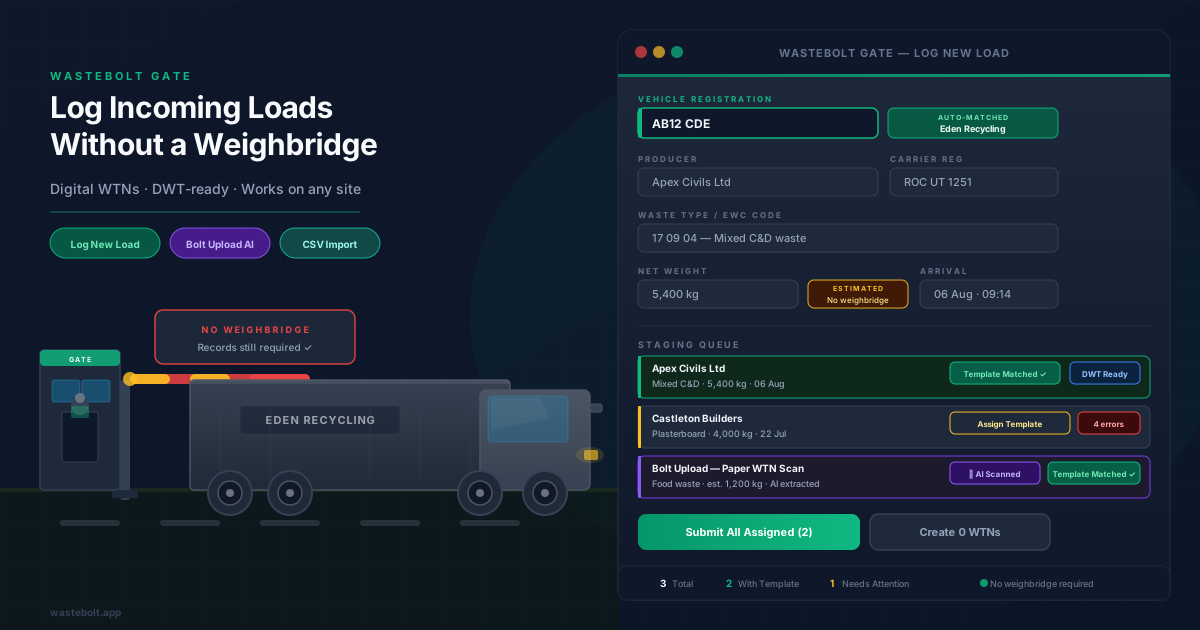
WasteBolt Gate gives sites without weighbridges three intake methods, each designed for a different workflow:
Manual gate log
Best for: gatehouse teamsFill in a simple form — vehicle reg, waste type, estimated weight, arrival date. If the vehicle is already in your system, the producer, carrier, and consignee details auto-populate in seconds. The load is staged for WTN creation. Takes under a minute.
Bolt Upload (AI scan)
Best for: paper WTNs received from carriersIf the carrier arrives with a paper WTN or you receive one by email, photograph or upload it. WasteBolt's AI reads the document and pre-fills the record — producer, EWC code, weight, carrier details. You review, correct anything, and the load is staged. No re-typing.
CSV batch import
Best for: end-of-day or batch entry from a spreadsheetIf you're currently logging loads in a spreadsheet throughout the day, export it and upload in one go. Map your columns to WasteBolt fields using the column mapper, and all rows stage at once. Useful for back-filling records or high-volume days.
All three methods feed into the same staging queue. From there, you assign a quick-fill template — which auto-populates producer, carrier, EWC code, and standard fields — and issue the WTN. The whole process from gate arrival to issued WTN takes a matter of minutes.
What to record for weight without a weighbridge
The weight field on a WTN does not need to come from a certified weighbridge reading. It needs to be your best reasonable estimate of the weight transferred. Here's how to approach it by vehicle and load type:
Skip load — known container size
Use the standard density estimate for the material type. A 10-yard skip of mixed C&D typically weighs around 4–6 tonnes — record as an estimated figure and note the skip size in the description.
Grab lorry or tipper — known vehicle payload
Record the vehicle's rated payload as a maximum weight. Most grab lorries carry 12–18 tonnes — record the agreed or typical load weight for that vehicle.
Agricultural or inert material — agreed tonnage
If producer and receiver have an agreed load size per delivery (e.g. 20 tonnes of topsoil per articulated vehicle), record that agreed weight and note it is an estimated figure.
Unknown weight — load weighed at destination
Record a provisional weight at intake. Once confirmed at a third-party weighbridge or the receiving facility, update the WTN before final submission. WasteBolt lets you edit staged records before issuing.
Digital Waste Tracking without a weighbridge
Mandatory Digital Waste Tracking requires all permitted waste sites to submit movement records digitally from October 2026. Many sites have assumed this means they need a weighbridge — it does not. What DWT requires is the data, not the hardware.
WasteBolt Gate provides a clear path to DWT compliance for sites without weighbridges:
- 1
Log each incoming load via Gate — manual entry, Bolt Upload, or CSV import
- 2
Assign a quick-fill template to auto-complete standard fields (producer, EWC code, carrier)
- 3
Issue the WTN — it becomes a complete digital record
- 4
Submit to the EA's Digital Waste Tracking service directly from WasteBolt
To make sure your records are DWT-ready before you submit, each staged record shows a DWT readiness indicator. Here's the minimum data you need:
DWT Readiness Checklist
- ✓Weight recorded (estimated is acceptable — flag it as an estimate)
- ✓EWC code selected (6-digit European Waste Catalogue code)
- ✓Producer details captured (business name, address, SIC code)
- ✓Carrier details captured (name and carrier registration number)
- ✓Vehicle registration recorded
- ✓Date and time of intake logged
- ✓R or D disposal/recovery code noted (for receiving sites)
Frequently asked questions
Do I need a weighbridge to create a Waste Transfer Note?
No. Waste Transfer Notes are a legal requirement under the Environmental Protection Act 1990 Duty of Care regulations, but they do not require a weighbridge weight. You can record an estimated or agreed weight, or in some circumstances leave the weight field to be completed after measurement. What matters is that the WTN is accurate, signed by both parties, and retained.
How can a small site log incoming waste without a weighbridge?
Small sites can log incoming waste using manual gate logging software such as WasteBolt Gate. You record the vehicle registration, waste type, estimated weight, arrival time, and the producer and carrier details. The record is saved digitally and can be used to create a signed WTN. No weighbridge hardware is required.
Can sites without weighbridges comply with Digital Waste Tracking (DWT)?
Yes. DWT requires digital submission of waste movement records, not necessarily weighbridge-generated weights. Sites without weighbridges can submit estimated or agreed weights alongside their DWT records. WasteBolt Gate provides a pathway from gate log to DWT-ready record without any weighbridge software.
What weight should I put on a WTN if I have no weighbridge?
You should record the best available estimate — for example an agreed load size, a vehicle capacity figure, or a weight from a portable scale. If weight is genuinely unknown at the time of transfer, record it as an estimate and note that it is approximate. Avoid leaving it blank, as weight is a required field on a Duty of Care WTN.
What is WasteBolt Gate?
WasteBolt Gate is a digital waste intake tool built for sites that need to log incoming loads quickly — at the gatehouse, on a mobile device, or in the office. It lets you log a load in under a minute, match it to a quick-fill template, and issue a complete signed WTN. It works entirely without weighbridge hardware.
Watch the demo
Full WasteBolt Gate walkthrough — log, validate & submit to DWT
Log your first load with WasteBolt Gate
No weighbridge needed. Log incoming loads in under a minute, auto-fill templates, and issue signed WTNs — all from your browser or phone.
Stay ahead of UK waste compliance
Get practical guides, regulatory updates, and the occasional WasteBolt discount — straight to your inbox. No spam, unsubscribe any time.
By subscribing you agree to receive marketing emails from WasteBolt. See our Privacy Policy. Unsubscribe any time.